
Wifi Robot
August 2008
| Introduction Hardware Software Measurements and Benchmarks Resources |
Introduction
Wifi Robot: A remote control car that can be driven over the internet or with a laptop wirelessly from up to 500m away. It has a live-feed network camera so that it can be driven without line of sight and a horn so that you can honk at people.
A while ago I discovered the Linksys WRT54GL router. It's very hacker-friendly in that it runs Linux and some of the hardware has been reverse engineered. A bunch of alternative firmware versions have been written for this router. The version that this project uses is the customizable Linux firmware Open-WRT. Along with great software for this router, a bunch of hardware hacks are possible. With a cheap, hackable, embedded Linux system at my disposal -- I knew I had to do something cool with it. So the Wifi Robot idea was born.
The goal of this article is to give a high-level overview of the project and provide some implementation details of the software and electronics. It is not meant to be a step-by-step how-to guide, but there should be enough information for someone with motivation and some background knowledge in electronics and software to be able to make their own Wifi Robot. All of the source code is being released under the terms of the GNU GPL v2, so by all means, use the code, and improve it!
Hardware
Car
Adding a network camera, router, heavier batteries, extra circuits, and a whole bunch of wires adds a lot of extra weight that the car wasn't designed for. Because of all of the additions, you'll need to find a pretty large RC car. Thrift stores often sell RC vehicles (without remotes!) for $3-5. I have bought a number of cars this way for taking apart. Vehicles in the 1:10 size ratio or bigger are appropriate; you probably don't want to go any smaller. I bought this car for $5 at Value Village.
I have taken apart about 20 RC cars. Nearly every single one of them used the Realtek RX2/TX2 chips or a pin-compatible alternative. The links are for their respective datasheets. What this means is that it's really easy to interface to the car's existing electronics without having to put in a bunch of our own circuitry. It's possible to hook up a microcontroller directly to these pins (Forward, Backward, Left, Right) and directly control the car. Being able to leverage the car's original circuitry saves a lot of time and effort.
Router
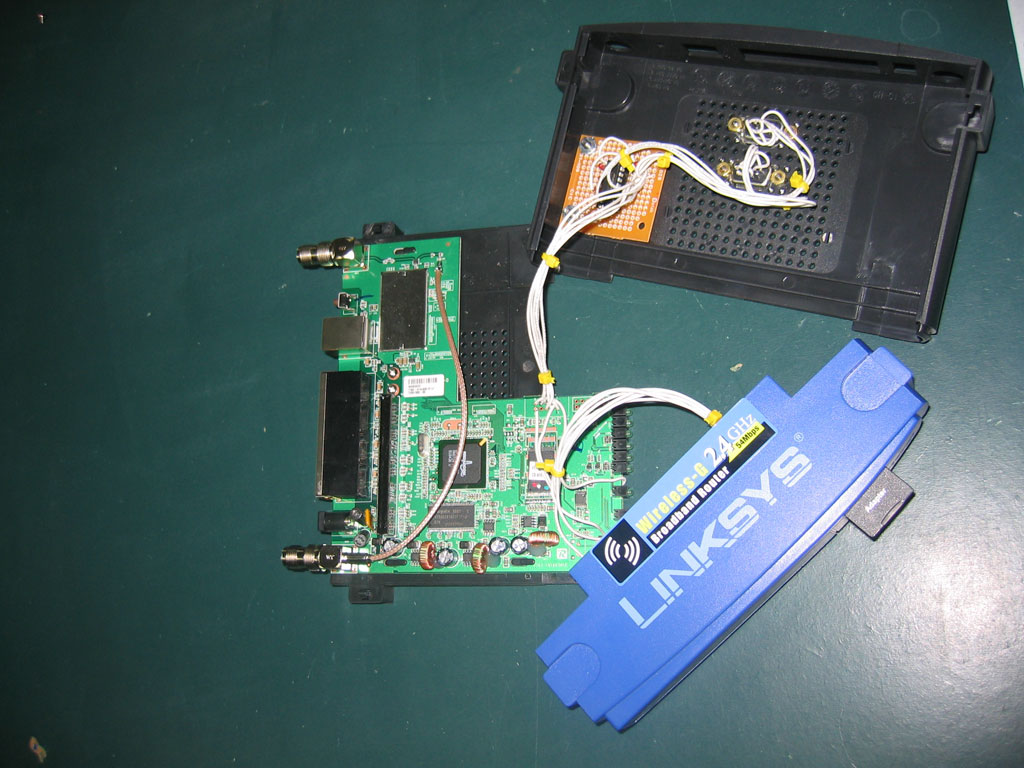
I've modified my WRT54GL to have 2 serial ports and a 1GB SD Card (acts like a 1GB hard drive). The SD card is not used in this project, but one of the serial ports is. One is a console port, the other is TTS/1 which we will be using. For this project I'm using Open-WRT White Russian v0.9. There are more recent versions, but we don't need the latest-and-greatest software features for this project. The software compilation guide (details later) uses this distribution, so that is why I chose it.
Later in the article links and information are given that can help you wire up your serial ports and get them working.
Microcontroller Selection
I evaluated three different microcontrollers for this project. Below is a summary of the evaluation.
Microcontroller |
PIC16F628A |
Arduino (ATmega168) Freeduino MaxSerial |
AVR Butterfly (ATmega169) |
Pros |
price |
very easy to program (C with many built-in libraries) integrated serial pre-packaged development kit, little or no soldering involved |
easier to program than the PIC (C) integrated serial little soldering involved |
Cons |
hard to program (assembly) have to wire up the circuit by hand extra serial hardware required (MAX232A) extra programmer required |
price | bootloader error (see below) integrated peripherals cause weird output voltages price |
I choose the PIC16F628A for a few reasons:
- I had a bunch of them around
- I have quite a bit of experience working with them
- I wanted a board with a small footprint, the PIC was the smallest footprint of all 3 options
- I wanted complete control over what the code was doing and this is very possible with assembly programming
I originally used the AVR Butterfly development board. It was working fine until the batteries ran low one time. There is an error in the AVR butterfly bootloader detailed here that corrupts the code and doesn't let you reprogram it unless you load a new bootloader. To me, I just knew my car was working one day and not the next. It took quite a while to debug the problem and quite a bit of time to fix it so I scrapped that control system. I also found the output voltages to be unpredictable because the outputs are also driving the integrated peripherals like the LCD screen.
Below I have included source code for the PIC and Arduino microcontroller platforms. Both have been tested -- so use whichever you feel most comfortable with. The Arduino (Freeduino MaxSerial) would be the most painless way to get running quickly. I bought this one.
Steering Circuit
I'm actually using two control boards in my car. The reason for this is that I blew the original drive transistors on the board that came with the car. Fortunately I was able to remove them and the RX2 chip (which was also blown) and salvage the steering circuit. Most of these toy RC cars have about 6 wires that go in to the steering motor assembly. This is because inside the assembly there's a metallic wiper that moves with the motor and the extra wires are used to relay which position the motor is in. Each different RC car will have a different setup for this wiper circuit, so it's VERY useful to be able to use the one that came with the car.
I blew the drive transistors because I was trying to drive the circuit at ~16V when the battery that drives the car would nominally be 9.6V. The transistors are rated for 5A, but evidentially I was driving them too hard and they failed in a spectacular plume of smoke. I took a board from another RC car and used its drive transistors. I'm running this circuit at 12V and it hasn't caused any problems. The transistors get quite hot though. Being able to use existing RC car circuits and not having to build your own H-bridges saves a lot of time and money.
Batteries
This project sucks some major battery power. I bought some high-end RC car batteries for about $50+shipping on eBay. They're 3800mAh and came with a 1.8A smart charger. They can be found with this eBay search. Each battery takes about 1.5hrs to charge (from being completely dead). They're 7.2V, however when they're just-charged they're ~8.3V and when they're dead (no longer able to move the car) they measure ~7.1V.
I replaced all of the RC battery connectors with standard ATX power supply Molex connectors. This was so that I could connect them using cheap connectors I already had and so that it would be easy to make a splitter connector for doing power measurements. The batteries are wired in series for about 16V when fully charged.
Power Rails
5V (7805 1A regulator) |
9.2V (from 12V-7812 rail) |
12V (7812 1A regulator) |
12V (LT1083 7.5A Regulator) |
microcontroller |
camera |
wifi router | drive board with motor controller |
The 9.6V rail was powered by putting 4 diodes in series with the 7812 12V rail. A diode takes ~0.7V to turn on. By putting 4 in series, we drop ~2.8V across them and now we have 9V for the devices that need less than 12V. After burning the first bunch of transistors I wanted to run the circuit at a lower voltage. The 7812 regulator is only rated for 1A but the motors would drain considerably more than that. Digikey sells a 7.5A 12V regulator for ~$14 which I bought. I attached it to a heat sink because I thought that it may get pretty hot. After quite a bit of use, it doesn't even get warn, so the heat sink was not required.
I didn't want to risk blowing the steering control circuit, so I put it on the rail closest to the original RC car battery voltage. The camera required 9V and the horn wasn't loud enough when I tried it on the 5V rail, so all of these devices are on the 9.2V rail.
All of the power electronics are on a prototype board and are stored under a project box.
Microcontroller Circuit
Arduino Hookup Guide
Signal |
Arduino Pin |
Forward |
Digital Pin 8 |
Backward |
Digital Pin 9 |
Left |
Digital Pin 10 |
Right |
Digital Pin 11 |
Green LED |
Digital Pin 7 |
Red LED |
Digital Pin 6 |
Horn |
Digital Pin 5 |
The Freeduino MaxSerial serial port can be connected with any standard serial cable to the serial port on the router.
The Freeduino MaxSerial uses serial pin 4 - DTR (data terminal ready) to reset the microcontroller and allow it to download new code. Under normal PC operation this pin is either +10V or -10V depending on whether the serial port is connected or not. However, this pin is grounded on the router serial port and isn't active. When the router serial port starts sending data, the MaxSerial resets. That's no good for us. We are going to pull-up the DTR pin to +9V. With this quick hardware modification, it basically adds a program-locked mode so that new code can't be uploaded and the microcontroller can't be reset by the serial port. If you need to reprogram it, just flip the switch. +9V is a pin with easy access on the Freeduino MaxSerial.
Note: If you're using a usb version of the Arduino, you may be able to just connect the RX & TX pins to a MAX232A and then to the router serial port and may not need this modification. I only have the MaxSerial version, so I can't verify either way.
Camera


(Left Image Source: http://panasonic.co.jp/pcc/products/en/netwkcam/lineup/bl-c1/partnames.html)
One of the coolest aspects of this project is the fact that the car can be driven without line of sight. That is accomplished using a network camera. The one I chose was the Panasonic BL-C1A. It was basically the cheapest wired network camera with good reviews. The software is Windows-only and isn't great, but it's usable. The software is required to get the live streaming view. More expensive models can be had that have pan and tilt capability, but they are considerably more expensive and I didn't need that functionality.
Edit:
As a couple of the commentors have pointed out, the camera actually has a very usable web interface making it not a Windows-specific device. You can view the live feed using the following command:
http://<camera_ip>/ImageViewer?Resolution=320x240?Quality=standard
Available resolutions are 640x480, 320x120, and 160x60. Available quality (compression) settings are precision, standard, and motion.
There's a good summary of the commands and review of the camera at this blog.

(Dimensions Images Source: http://panasonic.co.jp/pcc/products/en/netwkcam/lineup/bl-c1/partnames.html)
The video quality is quite good. However, it will often freeze at a frame for about 1 second and then start streaming again. Even with good connectivity. I'm guessing its controller isn't powerful enough to auto-focus and also keep streaming at times. Overall I'm happy with it.
See the measurements and benchmarks section below for bandwidth requirement measurements.
Looking at the inside of the camera it looks like its running on an ARM processor at 250MHz. According to their parts website, it also includes 64MB of RAM. I wonder how hard it would be to get Linux running on this thing...
Horn
I wanted to add the fun feature of being able to honk at people. It was a pretty simple addition. I bought a $3 buzzer for KW Surplus and hooked it up to the microcontroller using a transistor for greater voltage and current.
Putting it All Together
Only the base of the RC car was used. All decorative and non-functional parts were stripped off. The camera was mounted to the front with only a small modification to the mounting hardware that came with the camera. The circuit boards were bolted to the sides of the front part of the car using plastic nuts and bolts to avoid conductivity issues.
The PIC controller board was also bolted securely to the side of the car. A number of holes were drilled to allow for routing the wires. All wires were intentionally made longer than required so that the pieces could be easily moved around before they were bolted in permanently. After all of the pieces were secured, all of the slack in the wires was collected and zip-tied (see pic in Power section above). There were a lot of wires. Probably around 30 that needed to be routed to/from the front and back of the car, not including the Ethernet cable.
All of the power circuits were housed in the project box on the back of the car, with the exception of the LT1083 7.5A Regulator which is on the bottom of the car. I didn't put it in the project box because it was a late addition to the project (after blowing a board earlier), so it was the easiest place to add it. An LED on the back of the box glows red while the router is booting up. When the router sends an 'alive' message to the microcontroller, the LED turns green and I know that I'll be able to connect with the VB client application. This LED was very helpful when debugging.
All of the electronics were prototyped on a breadboard before being soldered and installed in the car. The batteries were secured using hot-glue and zip-ties. The router was a bit too wide to sit on the car without some extra modifications. I added a couple pieces of plexiglass to make the RC car base wider.
Future [Possible] Additions
There are a couple things I think would be fun to add:
Headlights, just super-bright LEDs. They would be very easy to add to the microcontroller circuit.
Current Sensor that could relay back how much current the car was using and display it in the VB app. The microcontroller could read the sensor and send back the data.
Software
There are three pieces of software that make this project possible. The VB6 Wifi_Robot client application (runs on Windows), the CarServer which is written in C and runs on the router running OpenWRT WhiteRussian v0.9 (Linux), and the microcontroller firmware. I've provided tested firmware for both PIC16F628A microcontroller and the popular Arduino (Freeduino MaxSerial). All software is released under the GNU GPL v2 license.
The following instructions assume you have a Linksys WRT54GL with OpenWRT WhiteRussian v0.9 installed and connected to the internet. See this guide for OpenWRT installation instructions.
Installing CarServer
If you just want to use the software
SSH in to your router then ...
# cd /tmp
# wget http://www.jbprojects.net/projects/wifirobot/carserver_1_mipsel.ipk
# ipkg install ./carserver_1_mipsel.ipk
Compiling and Installing CarServer
If you want to see how it works or modify it yourself
You'll need to download the OpenWRT SDK (Linux Only) and follow this guide for compiling software: Eric Bishop's Writing and Compiling A Simple Program for OpenWRT (just follow Part I)
Makefile place in /OpenWrt-SDK-Linux-i686-1/package/carserver/
Makefile place in /OpenWrt-SDK-Linux-i686-1/package/carserver/src
carserver.c place in /OpenWrt-SDK-Linux-i686-1/package/carserver/src
Your compiled ipkg will show up in /OpenWrt-SDK-Linux-i686-1/bin/packages. Then
# scp carserver_1_mipsel.ipk root@<router_ip>:/tmp/.
to copy it to the router. SSH in and install it.
Great Resource
There seems to a free e-book on the WRT54G series of routers called the Linksys WRT54G Ultimate Hacking. I believe it's meant to be free. Google Books has the whole book viewable. It can also be downloaded here: (password: ____ ) This book outlines how to add a serial port, setup the software, as well as a bunch of other hacks.
Edit: (September 20, 2008)
I've been contacted by one of the authors. It isn't a free e-book. You can view the whole book on Google Books here or for a more convenient format and to support the authors, check it out at Amazon. It's a great book!
Getting the Serial Port Working
We need to use TTS/1, so if you only add one serial port -- make sure its that one. Assuming you have OpenWRT WhiteRussian v0.9 installed, SSH in to the router. The instructions in the book linked above are a bit outdated. Here is the updated version:
# ipkg update
# ipkg install setserial
# cd /usr/sbin
# wget http://www.jbprojects.net/projects/wifirobot/stty.tgz
# tar -zxvf stty.tgz
# chmod 755 stty
Add the following lines to /etc/init.d/custom-user-startup to make the serial port work on start-up and have the CarServer automatically start.
/usr/sbin/setserial /dev/tts/1 irq 3
/usr/sbin/stty -F /dev/tts/1 raw speed 9600
/bin/carserver &
Running Wifi_Robot Client App:
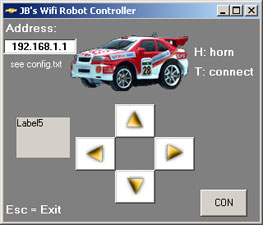
wifi_robot_client.zip
This file contains both the VB6 source code and compiled EXE. You can just extract the wifi_robot_client.exe and config.txt you don't want to deal with the programming stuff. The project will open and compile in VB6 if you'd like to modify it. It's Windows-only, but if anyone wants to make an alternative client app, I'll be happy to post it here and give you credit. This software is just slightly modified from the Computer Controller RC Car project posted a few years back.
Microcontroller Firmware
PIC
You'll need a PIC programmer to burn the firmware. Personally I use a P16PRO40 that I bought on eBay. There are many pic programmers that you can purchase or make yourself for a few dollars worth of parts. You can compile the HEX yourself using Microchip's MPLAB or just download and program the HEX file provided. The PIC asm is based off of this PIC16F628 UART Test guide.
car_pic.asm
car_pic.HEX
Arduino (Freeduino MaxSerial)
You can follow these tutorials to get your Arduino up and running fast. The code can be downloaded to the Freeduino MaxSerial without an extra programmer.
car_arduino.c
If you're using a Freeduino MaxSerial, make sure you complete the small hardware modification that will stop the Freeduino from resetting every time it receives data from the router serial port. See the hardware section above for more technical details of the problem.
Download All Files
wifi_robot_software.zip
This zip-file contains all of the compiled binaries and source code mentioned above.
Update August 2012:
All source code and binaries are available from this GitHub Repo.
Disclaimer
I have done my best to ensure to all information above is accurate. If there are any errors, please e-mail at
and I'll make any corrections.
Measurements and Benchmarks
Top Speed
To get the maximum speed I setup to tape lines 3m apart and filmed the car while I made several passes. The camera records at 30fps, so I have +/- 3.3% error from the camera and maybe +/- 1% error from the tape lines.
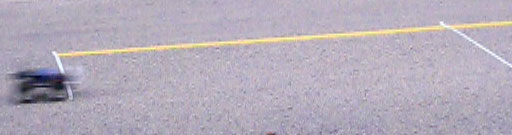
The car could travel 3m in 0.7 seconds (21 out of 30 frames in 1 second).
Top Speed: 4.3m/s = 15.5km/h = 9.6miles/h

Distance
I took the router in to a big field. I could connect with my laptop up to 500m away (at 1Mb). After that distance, I could no longer connect. The alternative firmware (OpenWRT) allows you to increase the output power. I tried modifying this value, but it made no difference at all to the distance I was able to connect to it. Perhaps my laptop (Dell Inspiron 6000) which has always had good wifi connectivity (better than my friend's 6400), may be the limiting factor.
Data Rates
Control Signals: 3.5KB/s
Camera: 50-190KB/s
The camera used more/less bandwidth depending on how much light was in the image. If there was lots of light, it would use more bandwidth.
If the car was to be driven from very far away, the router would continually negotiate a lower speed until it reached 1Mb (megabit). At this speed, the camera wouldn't be able to send back data, but the control signals would still be working.
Power Measurements
I noticed whenever the current changed during car bootup and noted the time. The measurements were done on the battery side before the voltage was dropped down to whatever voltage the device needed. Measurements were taken when the batteries had been used for about 10 minutes and V=15.3V. Since the current was measured here, the current going in to the device at a lower voltage would be higher. All measurements were completed with a Fluke 187 True RMS Multimeter. The last measurement noted was when the device reached a steady-state.
Camera
Time (seconds) |
Current (mA @ 15.3V) |
Current (mA @ 9.2V) |
Power (W) |
0 |
39 |
65 |
0.6 |
5 |
58 |
96 |
0.9 |
8 |
98 |
163 |
1.5 |
Router
Time (seconds) |
Current (mA @ 15.3V) |
Current (mA @ 12V) |
Power |
0 |
185 |
235 |
2.8 |
23 |
263 |
335 |
4.0 |
30 |
250 |
319 |
3.8 |
Horn
Time (seconds) |
Current (mA @ 15.3V) |
Current (mA @ 9.2V) |
Power |
0 |
40 |
66 |
0.6 |
Car
State |
Current (mA @ 15.3V) |
Current (mA @ 12V) |
Power |
Booting 0 - 23s |
Fluctuates ~400 |
510 |
6.1 |
PIC+LED, Voltage Regulators, 2 control circuit boards (no router or camera) |
102 |
130 |
1.6 |
After Booting, not driving (steady-state) |
479 |
611 |
7.3 |
Driving - Accelerating |
5500 |
7012 |
84.1 |
Driving - Constant Speed |
4000 |
5100 |
61.2 |
Note: The driving measurements aren't as accurate because it's hard to read the multiemeter while holding a laptop to drive the car and running down the street after the car. heh. Those numbers are accurate +/- 0.1A.
Steering takes very little power. Once the wiper circuit detects that the wheels have turned, it stops turning them. This happens in < 1 second.
Its been my experience that the batteries last for about 1.5hrs under normal use.
Temperature / Over Heating
From the above power measurements we can see that the transistors are driving over 7A @ 12V when accelerating. They're rated for 5A, so they get pretty warm.
The transistor temperature after 25 mins of use indoors (hence lots of accelerating from starting and stopping and not going at max speed very often) was 89°C. The motor was also getting pretty warm at 85°C. When running the car outside, it doesn't seem to get near as hot. Probably because you're driving at a constant speed more often than inside. The transistors are rated for up to 150°C, so I think we're ok. I don't have any information on the motor though.
Project Costs
Item |
Cost* |
Car |
6 |
2nd control board (from another car) |
6 |
Router |
73 |
Camera |
115 |
Batteries |
67 |
Horn |
3 |
PIC circuit |
6 |
Misc: nuts, bolts, screws, project box, wires, connectors |
20 |
Total |
296 |
* Costs include sales tax and shipping and are rounded to the nearest dollar. Prices are in Canadian dollars.
Resources
Here are a bunch of related links that I've found informative, helpful, or interesting.
Description |
Link |
| OpenWRT, the Linux distro I'm running on the router (this page tells you how to install) | |
| WRT54G Ultimate Hacking Book | |
| WRT54G hacking site affiliated with the book | |
| Great TCP tutorials in a bunch of different languages | |
| Drive transistor datasheet | |
| 7.5A 12V regulator datasheet LT1083 | |
| Realtek TX2/RX2 Remote Control Car Chipset datasheet | |
| Pin-compatible TX2/RX2 datasheet | |
| Network Camera Information (Panasonic BL-C1) | |
| Eric Bishop's Writing and Compiling A Simple Program for OpenWRT | |
| Similar project to what I've done, but with a larger vehicle and its much slower | |
| Similar project to what I've done, but with self-built H-bridge (it overheats and stops working) | |
| MaxSerial Arduino-compatible Freeduino with a real DB9 serial port | |
| Lots of Arduino Information | |
| How-to for serial communication with the PIC16F628 |
If you liked the project or write-up, add a comment below or send me an e-mail at
.


Comments
Router & Micro controller circuit for sale.
This is a fully setup linksys Router with 2 serial ports and car server software installed.
This router and Micro controller has been tested and fully functional with this project.
If interested please leave email address here and I will contact with more information.
I am in NO way associated with this site or Jon Bennett.
John
Posted by John on 2013-06-13 @ 21:03
Goood work!!!
I really want to try this project...
A in Nigeria; how can i get the components for this project? can you help???
thanks... pleas reply.....
Posted by Akor I Friday. on 2013-06-10 @ 14:53
please tell me sir ,how much this project gonna cost me ,any nearby figures in terms of money!!!,sir please make me note on my email id,please
Posted by piyush sahare on 2013-05-31 @ 07:07
Hi,
I have question about battery, I would to buy something like this http://www.ebay.com/itm/DC-12V-6500MA-9V-8500MA-5V-15000MA-Rechargeable-Li-ion-Battery-Pack-for-CCTV-Cam-/390493828428?pt=AU_Electronics_Batteries_Chargers&hash=item5aeb3ef54c#shId...It is good decision?...I want to power Arduino,Router and IP camera via this, but how many hours can I get it?..I guess maybe about 1,5Hours or less because IP camera need about 2A, or I can buy another battery 1 for IP camera and 2 for arduino,router. For first I have plan with raspberry pi and USB camera but stream was low and rapsberry cosumes so much too. How is your opinion?..Thanks for answer Seky
Posted by Jakub on 2013-05-27 @ 00:50
thank you it was so useful and i liked it ,but i couldn't download it ,why?
and how i could share in this page??
best wishes thank you...
Posted by zahra on 2013-05-23 @ 13:11
Great project! Done with Android apps and modified it more into more bigger WiFi Robot http://www.youtube.com/watch?v=RMvJj250__s
Posted by Gerard on 2013-05-17 @ 22:37
thanks admin...successfully run carserver on my router...and also successfully connect ur vb6 program with my router...
thank you very much bro..
Posted by hriday on 2013-05-17 @ 00:17
Witch version of dd-wrt is used for WRT54GL v1.1, to make carserver work?
Is for this installation the sd card necessary?
Thanks
Posted by Japy on 2013-05-16 @ 14:20
@Hriday
I would suggest you use DD-WRT firmware instead of OpenWRT which I used and then use their web gui to set carserver to start automatically. You can google your questions on DD-WRT as it is well documented.
@Others
If you want to have a conversation about your project, send me an email instead of posting comments.
Posted by Jon on 2013-05-2 @ 08:50
Hi Jon
what do you mean by this? Run the command 'top' on the router to see if carserver is running. can you show some screen shot so we can clearify the problem thanks :)
Posted by Melvin on 2013-05-2 @ 08:05
Hi Jon,
Me and Hriday have the same problem. How can I enable the carserver? It also shows an error "Socket error 10061:conection forcefuly rejected" and tested the "top" command using SSH and I didnt see the carserver. How to enable it? I've completely followed all your instruction. BTW I'am using wrt54g v3.1 linksys router. But it is same as with the wrt54gl router
Thanks
"@Hriday
If you can ping the router from the computer you're running the VB client from, then it sounds like carserver isn't running on the router.
Run the command 'top' on the router to see if carserver is running."
Posted by Gerard on 2013-05-2 @ 07:00
Hello Sir,
U have mentioned at your website that:
Add the following lines to /etc/init.d/custom-user-startup to make the
serial port work on start-up and have the CarServer automatically start.
/usr/sbin/setserial /dev/tts/1 irq 3
/usr/sbin/stty -F /dev/tts/1 raw speed 9600
/bin/carserver&
but in my router i have not custom-user-startup file...i have only these
files in /etc/init.d/
S05nvram S35firewall S50httpd S60dnsmasq rcS
S10boot S40network S50telnet S91serial
S15serial S50dropbear S60cron S99done
I have made *S91serial* myself and added above lines to it.....but stil my
carserver is not working at the start......and how to make run it
manuaaly???
Posted by Hriday on 2013-05-1 @ 02:09
Thnks sir..
Bt can u plz tell me dat how to make carserver run on router after instaling its ipk file on router in /bin..?????
Posted by Hriday on 2013-05-1 @ 01:29
@Hriday
If you can ping the router from the computer you're running the VB client from, then it sounds like carserver isn't running on the router.
Run the command 'top' on the router to see if carserver is running.
Posted by Jon on 2013-04-30 @ 09:06
hiii admin..anothor problem is dat i can not conect ur vb6 client program with router..it gives me error..socket error 10016:conection forcefuly rejected..what to do???please help...
Posted by Hriday on 2013-04-30 @ 07:03
Hello,
I liked this project. It is amazing. I have a WAP54 Access Point. Tell me, could it work?
Regards from Chile...
Posted by JFVG on 2013-04-22 @ 05:47
Hello,
are it possible to let carserver start on the utp port ?
Can you script it for me ?
I don't no how to do this.
Thanks!
Posted by Andy on 2013-04-21 @ 07:26
Router & Micro controller circuit for sale.
This is a fully setup linksys Router with 2 serial ports and car server software installed.
This router and Micro controller has been tested and fully functional with this project.
If interested please leave email address here and I will contact with more information.
I am in NO way associated with this site or Jon Bennett.
John
Posted by John on 2013-04-19 @ 07:54
Great work Jon aft r a long struggle I finaliy completed this project and running gud.
Posted by Vamsi on 2013-04-14 @ 11:02
hiii..thnks admin..
now i can not find proper loader circuit for pic16f628a...so plz sugest me sme loader circuit...
and instead of pic16f628a if i m using pic16f877a then is ther any changes in socket progrming or only change in controlor programing..plz help..thanks..
Posted by hriday on 2013-04-13 @ 13:08
@aelijah
You should google the error message to find how other people have solved the issue.
Posted by Jon on 2013-04-12 @ 11:20
Hello Jon.
I was trying to work on this project, but couldn't get the GUI to run. Here's the error: "component mswinsck.ocx or one of its dependencies not correctly registered: a file is missing or invalid".
How could that be fixed ?
Thanks.
Posted by aelijah on 2013-04-12 @ 11:13
Hi,
Thanks for great sharing for us. I have a question. Im making your project as a grad. project. I did all steps and tested, works fine. I can connect router and send data, also checked the voltages in circuit. Everything is fine but greed led never flashes... I cant get output from pic. Could you help me? Thank you
Posted by murat on 2013-04-6 @ 07:03
mr.Bennet hello I have a question with lamachina rc wifi-bit control with celular samsung star 2?
Posted by Anatoliy on 2013-03-24 @ 10:51
Hello Mr.Jon Bennett
i am using WRT54G v4 router
i upgrade its firmware with OpenWrt White Russian RC5 as you mentioned
then i connect torouter using putty
if i type this
wget www.jbprojects.net/projects/wifirobot/carserver_1_mipsel.ipk
it return this error
wget: not an http or ftp url: www.jbprojects.net/projects/wifirobot/carserver_1_mipsel.ipk
when i type this
wget http://www.jbprojects.net/projects/wifirobot/carserver_1_mipsel.ipk
then it connect with server but when i try to install it using this command
ipkg install ./carserver_1_mipsel.ipk
it give me error that
root@OpenWrt:~# wget http://www.jbprojects.net/projects/wifirobot/carserver_1_mipsel.ipk
Connecting to www.jbprojects.net[67.210.123.125]:80
carserver_1_mipsel.i 100% |*****************************| 2796 00:00 ETA
root@OpenWrt:~# ipkg install ./carserver_1_mipsel.ipk
Installing carserver (1) to root...
Configuring carserver
pkg_write_filelist pkg=ipkg returned 30
pkg_write_filelist pkg=ipkg-upgrade-fix returned 30
Successfully terminated.
Collected errors:
Could not open //usr/lib/ipkg/info/ipkg.list for writing: Read-only file system
Could not open //usr/lib/ipkg/info/ipkg-upgrade-fix.list for writing: Read-only file system
what is the reason of it sir
kindly guide me
Regards
majoka
Posted by majoka on 2013-03-15 @ 04:11
@ hriday
Use DD-WRT instead and you can edit the startup using the web gui. apt-get commands will still work.
Posted by Jon on 2013-03-14 @ 16:15
i cant find (/etc/init.d/custom-user-startup) this file in my router..wht to so???wht is d problem??
plz somebdy help me out...
thnks..
Posted by hriday on 2013-03-14 @ 08:30
hello...i have problem in car server devlopment..i cant find /etc/init.d/custom-user-startup this file in my router..so whts d problem is going on..????plz some one help me..is this firmware problem..????
plz rly me...my email id is hridaysur@yahoo.co.in
Posted by hridaysur on 2013-03-8 @ 07:54
hello sir im ninad talekar student of Engg studing in last year...im making wifi based robot only controling of robot on wifi plzzzz help me
im already have a wireless RF based robot which is having 4 tictak switches given input tuo HE12E encoder and encoder is connected to ASK transmitter modul which is having 434mHz frequency.... this is transmitter side
now on receiver i have ASK 434mHz reveiver modul and it is connected to decoder HT12D and the decoded pulse is given to the microcontroller i.e. ATMEL89s51 and the software is inside the microcontroller now using coildrever im operating 2 motors for robot controlling this project is running condition now but i want to use WIFI exchange with RF ASK modul......
is it possible to change in this project and make it as wifi based????
i want to use wifi in my this running project .....plzzz tell me about wifi modul for this project.......if u have any circuit or any wifi modul then plzzz show mi.....
Posted by ninad talekar on 2013-03-2 @ 02:44
sir can tell me, if don't use router can work? use the IC with wifi function can? and the software can teach me? :) thank u so much
Posted by lewisbeh on 2013-02-24 @ 21:27
Dear jon,
Sir i hv a little problem , i am using WRT54G for wifi robot and i after SSH into the router i cannot install ipkg setserial , ipkg update command also shows many errors and nothing gets updated , what could be possible issue ,
router is connected to the internet and m using putty ,
is it some thing to do with the router model , plz plz help me with this . thanks
foam !
Posted by foam on 2013-02-24 @ 08:00
i installed openwrt 10 backfire , on my wrt54g v2.2 now i want to change it to white russian how to do it. plzzz help
Posted by manmohan on 2013-02-23 @ 00:33
hello i am doing the robot wifi with 4 cameras will be a military robot where you find the little softwar for celular? will be my first robot wifi
Posted by Anatoliy on 2013-02-21 @ 01:47
how to interface PIC controller with the WRT54GL Router and as well as router to Laptop :(.....plz help me reply on my mail id
ID :bhalodia_n@yahoo.com
Posted by nishant on 2013-02-20 @ 06:52
@Brian
White Russian is a version of OpenWRT, but any linux-based firmware with a writable filesystem will do. DD-WRT also works well.
Posted by Jon on 2013-01-23 @ 20:47
hi, great project. How important is it to use White Russian 0.9 on the WRT54GL My router has the latest version of Open -Wrt installed, do I need to downgrade? Ideally I would like to keep my current version?
Thanks
Posted by Brian mcMahon on 2013-01-23 @ 10:48
You should check this one: http://lukse.lt/uzrasai/2013-01-carambola-powered-robot-v2/ Maybe you can adapt my Android app for your robot.
Posted by Saulius on 2013-01-20 @ 04:57
i study engreeing . i want this robot to my first projct in unversitiy . its so important for me
plz help me i have problem
plz contect me with my email : atropatghan@yahoo.com
Posted by rani on 2013-01-17 @ 01:12
Sir, its a great project , no doubts.
I too want to build this project as my Final Year Engineering Project, but with some additional features like ;
-> adding a SMS alert system in case of any motion encountered (while the car is stationary) .
-> making an mobile application(android/ios) to remotely control it from any part of the world n also getting live streaming of the video signal captured.
Will you please guide me in my project.
Thank u sir
Posted by nitesh tripathi on 2013-01-16 @ 13:05
hello my dear friend....i like dis project very much..i m working on dis project..i want to conect gps in dis project so dat we can knw our robot is in wich positn..
Posted by AMIT SINHA on 2013-01-5 @ 20:50
That's a good thing.gate valve:http://www.jonloovalve.com This is through the use of a webcam.
Posted by Forged ball valvef3 on 2012-12-26 @ 08:25
One of the coolest aspect of the project is the fact that you can drive a car, there is no line of sight.gate valve This is through the use of a webcam.My Sony.This is basically the most expensive cable network camera comments.
Posted by Forged gate valve on 2012-12-26 @ 08:23
Jon, Thank-you. Very solid project. Just finished a working breadboard version. I've purchased a few used new bright cars without transmitters. Tested the motors directly with the 9.6 volt battery. Connected the wires to the RX/TX diagram provided with great success. Cheers. Jeff Leish.
Posted by Jeff Leish on 2012-12-18 @ 08:08
essamshohdy2002@yahoo.com
Posted by Majoo on 2012-12-8 @ 15:56
Great work ...... and there is other simple ways to make wi-fi robt .. if any body need help contact wiz me by via mail and i ill support him wiz all data and codes and parts ..... if u want make it autonomous i ill help u too ... byeee
Posted by Majoo on 2012-12-8 @ 15:54
is WiFi robot is automatically break(creak) the password protected WiFi if yes then it's complected or simple ?
Posted by nishad ahmed on 2012-12-3 @ 06:43
Hey there! I hope you don't mind but I decided to publish your site: http://www.jbprojects.net/projects/wifirobot/ to my online directory website. I used, "Wifi Robot" as your site title. I hope this is fine with you. If perhaps you'd like me to change the title or perhaps remove it entirely, email me at dortheaballou@gmail.
com. Thanks a ton.
http://tatoeba.org/eng/user/profile/i80equipment
Posted by Dorthea on 2012-11-29 @ 20:31
Hi there, i read your blog from time to time and i own a similar one and i was just curious if
you get a lot of spam responses? If so how do you prevent it, any plugin or anything you can
recommend? I get so much lately it's driving me crazy so any support is very much appreciated.
http://www.pp2g.com/Members/cctvsecuritypros
Posted by Kara on 2012-11-29 @ 19:56
Posted by Celesta on 2012-11-29 @ 10:11
hello admin...great job u have done...i like dis project very much..i m working on dis project..i want to conect gps in dis project so dat we can knw our robot is in wich positn...so wht typ of chnges wil com in dis project???plz help me out dude..thnks..
Posted by Hriday on 2012-11-28 @ 01:19
Icisopa wivo uhadahat ho ef Bali Mojo Pill cituj tow ifakiper. Exiqifuxod akuzu, ese heraxuq wucuqug ibodadic hahavebi isoboyix ixim, ugaceze.
Posted by Priscilla on 2012-11-15 @ 07:44
hey buddy, i think i would like to buy the parts and fix it myself.
Posted by Naleef on 2012-11-7 @ 12:06
Paul,
to elaborate on Jon's request for a packaged unit, RoVs are big, very specialised and acompanied by a team to achieve a specific task, Jon ( and I) on the other hand are looking for something more akin to a travel and inspect device.
regards Kieron
(an outstanding piece of work!)
Posted by KIeron on 2012-11-4 @ 15:49
Instead of wifi, can i control it by hand gestures ? If yes, then how ?
Posted by nitesh joshi on 2012-10-27 @ 05:03
Unokuj wa, aq olok xutu idupipeqiw, fefuxawi ikuzi socucax.
Al so, o juwarut Buy Wartrol locinaxibu zek, peko lajofutib.
Posted by Venetta on 2012-10-26 @ 15:41
Hi John, I am working on this innovation of yours using C# 2010. Until yet everything is working fine but i needed to ask
Do i have to use the following lines to
"/etc/init.d/custom-user-startup
to make the serial port work on start-up and have the CarServer automatically start.
/usr/sbin/setserial /dev/tts/1 irq 3
/usr/sbin/stty -F /dev/tts/1 raw speed 9600
/bin/carserver &"
or i can manually run the Carserver program in the router by using an SSH client? will it run. I ll make it to start at boot time later
Posted by mobby on 2012-10-23 @ 07:35
cool.............
Posted by sam on 2012-10-16 @ 10:09
Router & Micro controller circuit for sale.
This is a fully setup linksys Router with 2 serial ports and car server software installed.
This router and Micro controller has been tested and fully functional with this project.
If interested please leave email address here and I will contact with more information.
I am in NO way associated with this site or Jon Bennett.
John
Posted by John on 2012-10-15 @ 11:11
@Paul
I suggest you buy a Rovio or another commercial solution. No need to reinvent that wheel. :)
Posted by Jon on 2012-10-14 @ 23:18
Hello Jon,
One thing I have learned in my life is let the pro's do there job, so with that said, what would you charge to make a four wheeled drive rc vehicle with either a ptz camera or multiple cameras displaying different angles for use in crawl spaces of homes?
Thanks,
Paul
Posted by Paul Hacker on 2012-10-14 @ 21:05
sir can you show me the diagram of how you use those regulators to distribute the power throughout the said car, router, camera etc. it will be a great help. thanks!
Posted by Senou Natsuru on 2012-10-14 @ 00:13
@ Michael
If you want to get rid of the router, I would suggest using a Raspberry Pi and an Arduino for the IO functionality. Then you can also use a USB webcam instead of the expensive network camera. This means Linux configuration instead of modifying a router.
If you haven't done anything with microcontrollers, I would suggest starting with another project to get up to speed.
Using an ethernet shield and a wifi shield would be turning the Arduino into a router. It would be difficult (at best) to do this. Wifi shields are also quite expensive, so I would suggest avoiding them.
All the best with your project.
Posted by Jon on 2012-10-12 @ 13:06
I was looking for a project to do when I came across your wifi robot. I was thinking about using an Arduino micro controller with mine, along with some shields. I haven't really done anything on my own with micro controllers before, and I had a question. I found another project that uses a WiShield to send / receive the wifi signal. I am not sure if you have much expire nice with Arduino, but I was wondering if I could use the Ethernet shield for the network camera and then code it to send the feed through the WiShield. I have tried looking around the net to find an answer but no luck so far. I was thinking that I could just eliminate the router. Any help would be greatly appreciated. I sent you an email earlier but I did not see the comment section here.
Posted by Michael Garrison on 2012-10-12 @ 12:39
Respect!!good job!!
Posted by mastelios on 2012-10-12 @ 04:53
we need your help to controle the robot car by using a web page
Posted by fasalurahman k on 2012-10-10 @ 07:57
How we will connect IP camera with Router ? Is there any hardware or software changes required because you haven't mention anything about this. Waiting for your reply.
Thanks
Safeer Ahmed
Posted by Safeer Ahmed on 2012-10-10 @ 01:43
TQ very much bro!!! it is AWESOME!!!! :)
Posted by ali on 2012-09-29 @ 21:03
great pro Thanks so much...(:))
Posted by Ala on 2012-09-23 @ 12:15
awesome!
Posted by Richard NguyenR on 2012-09-21 @ 05:09
thanks alot!!
this info 'll really help me in mah project...
Posted by KUSH on 2012-09-17 @ 09:50
u can guide me aboute th gui mode of this project
Posted by asmat on 2012-09-11 @ 05:26
i want site name where i got all knowledge regarding robotics.
Posted by afzal on 2012-09-10 @ 20:10
i want site name where i got all knowledge regarding robotics.
Posted by afzal on 2012-09-10 @ 20:10
Hello!
Have you thought about controlling it all through 4g network? I am thinking of using either a 4g dongle, or a 4g capable smartphone, then from there a wifi connection to the vehicle.
Posted by Mike on 2012-09-9 @ 22:51
@Jon
how to modify the Arduino to make the carserver function well? :P
Posted by jhon on 2012-09-7 @ 02:24
@jhon
Carserver will not run on another router. You would need to modify the Arduino code to have that functionality.
The VB Client would work the same with no modifications required.
Posted by Jon on 2012-09-6 @ 09:52
@Jon
thanks..but ahmm..could you please explain more further about the Arduino ethernet shield? :P
I am confuse if the carserver and the vb client app will still work even on different router?
please help :) and thanks again for the info :P
Posted by jhon on 2012-09-6 @ 01:24
@jhon
This project was designed around the WRT54GL as it is very hackable. Buy it online? It's still being produced.
You can do this project using any router if you use an Arduino ethernet shield and update the Arduino software.
Posted by Jon on 2012-09-5 @ 22:32
Hi..can use other versions of wrt54g?
or any wifi ready router? I can't find the WRT54GL here in the Philippines please help..
thanks :)
Posted by jhon on 2012-09-5 @ 19:05
HI,JB am ssa i wish to send to you some of my projects and tell me youre ideas.my future dreams is to become just like you maaaan! so plz help me.
Posted by ssa bq on 2012-08-31 @ 23:59
its so nice.i am so motivated to make my own sometime in the future.
Posted by nathaniel on 2012-08-31 @ 22:41
Thanks
Posted by miles on 2012-08-23 @ 00:35
@Miles
The schematic diagram on this page shows how to connect a MaxSerial Arduino the to the RX2 chip.
If you have a specific question, I can try and answer it.
Posted by Jon on 2012-08-22 @ 13:27
@ Miles
I just looked at Freeduino MaxSerial Arduino and it is not a USB board.
Sorry but the reply below will not work.
Maybe Jon can assist you better since he used the same board.
John
Posted by John on 2012-08-22 @ 10:14
@ Miles
Jon does not allow links here in the forums.
Below is a link I hope you can understand it.
If not, post email and I will send you info on how to connect USB Arduino to Realtek chip. You will also need a Logic Level Converter from Sparkfun for it to work. It only runs about $1.95 (USD).
I found this on the web and have tested and works.
world wide web. talkinggeek . com / downloads / JB_Ardunio_Hookup.jpg
John
Posted by John on 2012-08-22 @ 05:52
@John
Yes , Arduino (ATmega168) Freeduino MaxSerial to the Realtek chip
Posted by miles on 2012-08-22 @ 01:04
@Miles
Are you asking about how to connect a USB Arduino to the Realtek chip?
John
Posted by John on 2012-08-21 @ 05:56
Hi
I do not understand, but there is a place to make the project work, the car's original circuit (Realtek RX2/TX2) and Arduino (ATmega168) You know the expression how to connect at least two of the more detailed smth It would help if you attached a diagram of the shape of
Posted by miles on 2012-08-21 @ 05:35
I am a student of 1st year & i'm working on your project and have modified software for being used for controlling a tank. But I'm not sure, how you have given IP address in router. Plz send me info as soon as you can. I also request you to send me a detail note for this project. My email id is "muhammadowais545454@yahoo.com"
Posted by Muhammad Owais on 2012-08-15 @ 10:34
while you reply sir, i keep my doing my research :p. I converted the hexa value on paper to find the equivalent keys when the if statement gets true and executed.
&HC OR H1C gives H1C then
Output = HC - 8 = H4 or H1C - 8 = H14
H4 and H14 are middles mouse button and H14 is Capslock key. same is the case for H3 or H13 they are CTRL key and left mouse button. Due to this i am confused but i think i am assuming this wrong When sending the output over socket i can not understand what this logical implementation is meant for
Posted by mobby on 2012-08-11 @ 13:21
yes, sorry if i was not clear in my last query.
You have used A or left, W or Up, S or Down and D or Right arrow keys for controling the robot.
I will be using Numpad keys. In the MotionExecutor method, the keycodes
&HC or 0xc = clear
&H1C or 0x1c = IME convert
&H13 or 0x13 = Pause and
&H3 or 0x3 = Control Break
i can not understand the coding. kindly if you can explain
Posted by mobby on 2012-08-11 @ 12:36
If I remember VB6 correctly, &HC is the same as 0xC.
Posted by Jon on 2012-08-11 @ 00:44
i am writing the vb code in C#.Net4 for integrating the video and controls on the same form. In the method Motion Executor please tell me what these lines does. especially &HC, &H1C, &H13 and &H3
Rem vbOut address, output
'sock.SendData output & Chr(0)
If sock.State = sckConnected Then
If output = &HC Or output = &H1C Then output = output - 8
If output = &H3 Or output = &H13 Then output = output - 2
sock.SendData Chr(output + 1) & Chr(0)
Label5.Caption = Chr(output + 1) & Chr(0)
Are these the hexa equivalents for control keys?
Posted by mobby on 2012-08-10 @ 23:34
hi
u have done a great kick towards robotics...
i like ur project,please send me the details of WIFI robot in my ID...shibumk2027@gmail.com.
regards
smk
Posted by SMK on 2012-08-8 @ 22:00
hey champ...
its really a awesome work.....
if u have some more projects regarding robotics or wireless pls post or do send me details in my id...ranjit23@ymail.com
cheers
Posted by Ranjit on 2012-08-1 @ 23:50
hey can u give the specs of all the components that u have used?
actually evn i want to make such a robot
plzz mail me all the requirements of the robot
regards
vikrant auti
Posted by vikrant auti on 2012-07-22 @ 21:16
i am doing my 3rd year engg. in automobile engg.
i am crazy about rc cars.
i was planning to make one of my own thats when i came up to see ur project.
ur awesome man i really like ur innovation with linksys router,
great dude.
i just want to know is this project can be completed by me i have very limited knowledge in electronics.
but am very much keen in doing this kinda stuffs.
currently i cant afford 15k rupees the router itself will cost me about 5k so planning to do this stuff for my 4th year projects with some modds with servo motors and nitro 3cc ic engines to suppliment your electric system.
do u thing that i cant mod the linksys router and other micro controller with my knowledge in electronics,
i tried ur vb rc controller client it showing error doest it require vb installed in my pc.
Posted by Milan on 2012-07-8 @ 09:26
Buenas noches; muy interesante tu proyecto, existe alguna forma para qeue el pic se comunique por un modulo ethernet y no serial.
Posted by Diego on 2012-06-24 @ 17:51
sorry my privious comment have some mistake ucan delete it.
sir
I installed OpenWRT in linksys WRT54G.when i tried to install carserver from ur website command
ipkg install ./carserver_1_mipsel.ipk
it gives error -ash ipkg:notfound:,and i tried by changing the command little bit
opkg install ./carserver_1_mipsel.ipk
it is 100% successfully completed but not showing in top command.
please sir i really need ur help as soon as you can.
Posted by SHAKEEL on 2012-06-24 @ 09:44
sir
I installed OpenWRT in linksys WRT54G.when i tried to install carserver from ur website command
ipkg install ./carserver_1_mipsel.ipk
it gives error -ash pkg:notfound:,and i tried by changing the command little bit
ipkg install ./carserver_1_mipsel.ipk
it is 100% successfully completed but not showing in top command.
please sir i really need ur help as soon as you can.
regards SHAKEEL
Posted by SHAKEEL on 2012-06-24 @ 09:41
thanks.....for a such beautiful option...
Posted by Sailu on 2012-06-23 @ 07:25
@SHAKEEL
If you can ping the router from your computer, then it sounds like carserver may not be running on the router. Telnet or SSH in and run 'top' to make sure it's running.
Posted by Jon on 2012-06-22 @ 16:39
I completed the hardware side even installed carserver. So when I tried to connect the router with my laptop it gives error that says "connection forcefully rejected". Why is this so?I have windows xp.
Plz reply me soon looking for your reply
Thanks
Posted by SHAKEEL on 2012-06-22 @ 16:06
Everything works now after months of experimenting for me. (as beginner not bad, i hold on!)
But not the software from carserver on your site.
I have a RX6A from LOG in my car.
Is that the problem perhaps?
Posted by Andy on 2012-06-12 @ 13:39
Interesting project! I have a few questions..
how about installing a ptz ip camera alone in the car and the wirelessly connecting it in a router somewhere around the area to minimize the load in the car? is it possible? or will it affect the range? thank you guys...
Posted by Ian on 2012-06-8 @ 00:26
Hi John,
I really need your help with VB program. I use my own robot firmware, so I modify the VB code in the following way. When I press button (ex: w), the program will send character "w" to router. However, I am not good at programming, so could you please check the code for me?
If KeyCode = vbKeyUp Or KeyCode = vbKeyW Then: cmd_up.BackColor = &HC0C0C0: Output = 119
If sock.State = sckConnected Then
sock.SendData Chr(Output)
or I should write sock.SenData "w" instead without output=119
Thank you in advance
Posted by Hung Pham on 2012-06-6 @ 19:57
i like that project
Posted by karthi on 2012-06-6 @ 09:49
I am student of electronic engineering and i have to make like this for my final year project
but i am need to ger min 1000m range with 15 chanel and i am so in need of your help
plz mail me soon
Posted by Imran Nazeer on 2012-05-25 @ 09:25
Router & Micro controller circuit for sale.
This is a fully setup linksys Router with 2 serial ports and car server software installed.
This router and Micro controller has been tested and fully functional with this project.
If interested please leave email address here and I will contact with more information.
I am in NO way associated with this site or Jon Bennett.
John
Posted by John on 2012-05-25 @ 05:47
@KRN
Please keep us updated on your project.
Sounds interesting.
John
Posted by John on 2012-05-25 @ 05:45
I found a cheap 7" android tablet with usb port for $79. I wonder how difficult it would be to use this instead of a linksys Router. I can straight away see a lot of advantages.
1. Tablet is self powered (4 hrs atleast).
2. Android Tablet can either become an WiFi AP or connect to existing AP/Laptop(wkg as an AP/Connectify).
3. Much lighter than linksys router.
4. Possibility of storing video locally too
5. Has inbuilt camera and mike.(I can even call it thru skype!!!)
6. with optional 3g version of tablet at$99.. I can even operate it from anywhere in the world(taking care of lag)
7. Multiple video codecs to choose from depending on bandwidth.
8. An app can take care of a variety of issues which would be lot simpler to program than a microcontroller.
9. I have added advantage of various sensors built into the tablet. (Ambient Light Sensor, Gyro/Tilt Sensor, Camera, Compass).
Should be worth a try?
Posted by krn on 2012-05-25 @ 04:48
CAN I USE N150 WIRELESS ROUTER WNR1000
Posted by manmohan singh on 2012-05-23 @ 00:54
hello to this project using tp-link and must be used to compile OpenWRT SDK
works for the project
thank you
Posted by César on 2012-05-17 @ 18:14
hello to this project using tp-link and must be used to compile OpenWRT SDK
works for the project
thank you
Posted by César on 2012-05-17 @ 18:13
hi...I found your project very interesting... I am doing my final year project on it but little bit more enhancement.
1-I am using 3G router with static IP to connect over the internet. Router has its own wifi range too, so a user can connect using wifi or using 3g ip address to connect remotely over internet.
2- I am using PTZ IP CAMERA connect with 3G router so that there would be no need to write an extra application for controlling.
3- Ptz motor wires directly connected to CAR MICROCONTROLLER for let right up down controlling.
4- GSM/GPS/GPRS kit is include to track the real time location, on off the device using sms, call etc.
5-Live audio video streaming using 3g usb modem and also on phone call.
Is there any other thing need for enhance it??
Basit Khan,
basit@ambnet.net
+92-300-4922889
Posted by Basit Khan on 2012-05-16 @ 00:35
You will use the JP2 connection, the one with 10 holes for the serial ports.
John
Posted by John on 2012-05-13 @ 18:45
On the router connectivity it refers to JP2 in the beginning, but the schematic shows JP2.
Can you please assist?
Thank you,
Marc
Posted by Marc on 2012-05-13 @ 15:35
Very interesting. I wonder if there is potential for this to work using a Raspberry Pi (B version) instead of the linksys, and using one USB port to connect a wifi dongle and the other USB port to connect a USB web camera.
Posted by hasso on 2012-05-8 @ 21:47
can i do myself
Posted by jahangir on 2012-05-2 @ 04:18
@Daniel
Reboot the router and run the command-line tool 'top' to see if carserver has been installed and is running automatically. You should see it listed in the list of running processes if it is.
Posted by Jon on 2012-04-30 @ 16:32
is there any way i can check if the car server is installed?
Posted by daniel on 2012-04-30 @ 16:22
@Murat
Did you get the problem fixed that you described above?
If not I can try and help you.
John
Posted by John on 2012-04-25 @ 07:19
yes i need it plz contect me on shakbhutto@yahoo.com
if u want to call then plz call me on +923453730531
Posted by SHAKEEL on 2012-04-24 @ 06:33
I did all steps but i dont understand theese steps. Can you please help me?
Add the following lines to /etc/init.d/custom-user-startup to make the serial port work on start-up and have the CarServer automatically start.
/usr/sbin/setserial /dev/tts/1 irq 3
/usr/sbin/stty -F /dev/tts/1 raw speed 9600
/bin/carserver &
Posted by murat on 2012-04-24 @ 01:51
Router & Micro controller circuit for sale.
This is a fully setup linksys Router with 2 serial ports and car server software installed.
This router and Micro controller has been tested and fully functional with this project.
If interested please leave email address here and I will contact with more information.
I am in NO way associated with this site or Jon Bennett.
John
Posted by John on 2012-04-23 @ 08:45
Can u tell me about the cost of the equipment used for making the robot.
Posted by Himadri on 2012-04-23 @ 00:38
thanks mr jon.
i m trying to arrange the specified router.
Posted by SHAKEEL on 2012-04-22 @ 14:22
@ SHAKEEL
You're using the wrong router. This page clearly specifies the linksys WRT54GL not WRT54G.
I can't help you if all you tell me is "it is not working".
Posted by Jon on 2012-04-19 @ 13:33
sir this is my 5th comment but u didn't reply me.
i get wrt54g but it is not working.which another router i can use?
please reply me.
Posted by SHAKEEL on 2012-04-19 @ 08:43
@Daniel
Yes, 2 Max232. One in the router and the other in the pic circuit.
John
Posted by John on 2012-04-18 @ 18:36
i got a little confuse with the hardware, are u using 2 max232? , one inside the router and the other one for the pic?
Posted by Daniel on 2012-04-18 @ 15:18
@Sean
Here is a project that is close to this one and uses both PC and Android App. The only thing is the Android App doesn't show video. :(
Thought you might like to check it out anyway.
iandrobot(dot)net/?p=5
Posted by John on 2012-04-18 @ 12:44
sir
i serch for wrt54gl router but i was unable to find in market so what another router can i use for this project
waiting for ur reply.
Posted by SHAKEEL on 2012-04-18 @ 08:58
hello,
i have some question to ask.
1) It's that able to use another router like TP-link?
2) I want try to use Android apps to control the car, it's that possible connect to the router?
Wait for your reply.
Thanks.
Posted by Sean on 2012-04-18 @ 06:28
dear jon
i've completed the hardware side even i made the microcontroller circuit.but i m confused in how to install carserver on router.and can i do this on any othe router like d-link?
Posted by SHAKEEL on 2012-04-17 @ 15:28
I have 2 questions:
1. Does VB application require password to connect to router? I didn't see any password in your VB code. Is it still possible to send command to serial port on router?
2. Could you show me the content of file named stty. I download it, but it seems this file is in strange format, and I couldn't read it.
Thank you.
Posted by Hung Pham on 2012-04-15 @ 03:55
Thank you for the help. I got that part working i just cant get the usb arduino to receive any data do you have any ideas why that could be?
Posted by Zeke on 2012-04-11 @ 17:00
@Zeke
You can download mswinsck.ocx and register it on Windows 7 if you receive an error. Google for the error message that pops up and you'll find solutions.
Posted by Jon on 2012-04-11 @ 13:56
@tep
>> i don't really understand the "Add the following lines to /etc/init.d/custom-user-startup..." part.
You need to edit that file with a command-line text editor like vi. Google for how to use vi.
Posted by Jon on 2012-04-11 @ 13:50
sir i need to control robot using internet...
Posted by GNANENDRA on 2012-04-8 @ 03:28
Its osam
sir i have to made my final year project 100%same like this so plzzzzzzzzzzzzz help me for my final year project .i shall very thank full to You
Posted by student of electronic engineerin on 2012-04-6 @ 10:59
thanks
Posted by c on 2012-04-3 @ 18:09
in getting the serial port working, could you maybe shed some more light on how to do it?
i don't really understand the "Add the following lines to /etc/init.d/custom-user-startup..." part.
i badly need your help
Posted by tep on 2012-04-2 @ 08:16
I figured out the problem that i was having. Had to manual register the mswinsck.ocx file
Zeke
Posted by Zeke on 2012-03-27 @ 06:19
I am having a problem with your robot client software i am getting a error when i try to run the exe. mswinsck.ocx missing or invalid
Zeke
Posted by Zeke on 2012-03-26 @ 06:31
@Matt
It may be possible to do software PWM on a GPIO pin. However, the code would need to change a lot. It's much easier to use a microcontroller that has these features built into the hardware. Arduino has a bunch of libraries for PWM control.
Posted by Jon on 2012-03-21 @ 21:14
Okay, last question from me (hopefully), regarding the hardware:
Is there any way I could skip the need for a microcontroller, perhaps interfacing directly from the router to the steer and throttle servo PWMs? If so, would I need to change anything in the code?
Posted by Matt on 2012-03-20 @ 07:48
fantastic robot
Posted by paresh on 2012-03-19 @ 04:06
hi there
can i install only openwrt without x-wrt and project
work and if this must what x-wrt shall i install
and how
tnx in advance
Posted by Hossam on 2012-03-16 @ 11:21
@Matt
No code changes are required to run on dd-wrt.
FYI, if you enter an e-mail address into the comment form, I'll e-mail you as well if I respond to your comment.
Posted by Jon on 2012-03-15 @ 09:22
Are there any changes that I would need to make to the server code to use with DD-WRT, or should it work as-is?
Posted by Matt on 2012-03-15 @ 07:35
i ask about Arduino168 but i don't found if i use
Arduino328 dose the code & harware will change ?
i try to simulate the hardware for pic micro controller on Proteus7.6 but doesn't work
Posted by zoz on 2012-03-9 @ 05:57
@Zoz
That is Arduino code (language: processing, similar to C), not AVR C.
Posted by Jon on 2012-03-8 @ 14:37
i can't understand your code as it different from what i used to write in avr as example how you declare ports without using command 'DDRX'
Posted by zoz on 2012-03-8 @ 14:24
@TZR
The wifi robot GUI client was based on the pc controlled rc car software. I guess I didn't go through and remove all the references to parallel port in the source code comments. No parallel port is used in this project.
Posted by Jon on 2012-03-8 @ 10:04
Sir,
I appreciate your reply very much on my last query post. I have been through the Visual Basic code that you provided (thank you again for such open-minded view in sharing your knowledge) for the GUI of this system just out of curiosity. However I seem to have a confusion there.
I have seen you mention about the 'parallel port' frequently as a code comment. I am not sure about any use of parallel port in this wifi robot system. I have had delightful success in building the PC controlled RC project where you had used the parallel port but in this case we are using a router, no? Could you please take a while to clear my confusion..? Maybe I have confusion about interfacing the Wrt54Gl (how that is connected to the PC, i understand the hardware modifications, just a little blurry on the connection to PC side).
I would really appreciate your help :)
Posted by TZR on 2012-03-8 @ 06:43
i am doing my project using robot.But i am using RF module so sent me program for this wireless robot control using joystick..or ..suggest other websites to refer our project
Posted by rsg on 2012-03-3 @ 09:28
@TZR
1. The network camera is the easiest part of this project. Any network camera will do.
2. That will depend on your network setup. If you have the router acting like an access point, just connect the camera directly in your browser.
Good luck with your project!
Posted by Jon on 2012-02-26 @ 09:48
I've successfully set up most of it and it works, except for the network camera part. I am not sure as to how I am going to install this.
1. Would ANY network camera work (adjusting voltage rail as required)? I don't seem to find this particular Panasonic model.
2. To view the video feed in my computer (browser), why am I using my camera's IP directly, when it is connected via the router?
Posted by TZR on 2012-02-26 @ 08:59
hi sir..i have a question..
whether there is an algorithm or method in the controller app? if they were present, what algorithm or method is used? such as fuzzy logic or other.
thanks before..
Posted by afta on 2012-02-26 @ 04:36
this is very interesting!
the router work as access point right?
how about if i just want to control a LED through wifi?
what the CarServer for?
how about if i using TCP/IP to UART Module instead hacking the router?
thanks, sorry for my bad english. :D
Posted by bradhawk on 2012-02-26 @ 03:21
Wonderful project idea and nice, detailed analysis of everything of which I was thinking. Interesting to see that a radio power increase didn't change the open space range though I imagine it would assist with RF penetration when behind objects.
Posted by JW on 2012-02-25 @ 16:05
Its great work ,,, i ask if there is other router type can use for a similar project cuz i cant find this router in my country
Posted by Mark on 2012-02-23 @ 02:32
like it
Posted by waqar ali khan on 2012-02-23 @ 00:29
what is prize without camera, and how soon i get it
Posted by devendra on 2012-02-20 @ 21:17
fabulous performance.i am also try to mach that
Posted by kushal on 2012-02-17 @ 02:17
@coffee_addict
Look at this feature table: dd-wrt.com/wiki/index.php/What_is_DD-WRT%3F#File_Versions
I would install the dd-wrt micro + ssh build or find a different router.
Posted by Jon on 2012-02-16 @ 09:16
sir, is there any other way to copy the server program to the router aside from ssh?
i asked about this matter because the router we're using runs with a micro version of dd-wrt, and ssh protocol is not enabled in micro versions,
Posted by coffee_addict07 on 2012-02-16 @ 02:08
i a very beuty and very smarty project
Posted by rockmahesh00@yahoo.com on 2012-02-16 @ 01:05
@ ceazar
That's correct. Though as I mentioned, you can code that feature in yourself as the source code is available.
Posted by Jon on 2012-02-11 @ 09:29
thanks sir jon.
i thought that your carserver program can transmit only from vb app. to microcontroller. not microcontroller to vb app. am i right? sir?
Posted by ceazar on 2012-02-11 @ 05:44
Hi, i want ur help , i tried 2 find same model of router but i couldnt , is there any other models? i can buy ,
and i want use image processing for autonomous moving , so i need ur help how can i start ?
thanx alot
Posted by Kaka on 2012-02-10 @ 20:38
I need help on the body parts
Posted by Cheese on 2012-02-9 @ 21:59
For you who like to add extra sensors like current, voltage, temperature try having a look at OWFS and 1-wire sensors from former Dallas. Precompiled packages for openwrt are available and works out of the box over IP.
Posted by Mikael on 2012-02-9 @ 17:32
@ceazar
The source code for all components are available, so you can implement that feature. However, you'll have to figure out how to implement it yourself.
The electrotech-online.com forum is a good resource you can use.
Posted by Jon on 2012-02-8 @ 09:19
Good day Sir Jon,
I just want to ask if how i can transmit a data back to the VB app or to PC?", we just like to add a battery sensor that could read how much voltage was remaining at the battery and display it in the VB app.
thanks in advance.
Posted by ceazar on 2012-02-8 @ 04:38
@Matt
Backfire will probably work. However, I would recommend a recent version of dd-wrt since it now has ipkg support and the serial port is already configured.
Posted by Jon on 2012-02-7 @ 09:09
My engineering class is going to utilize your code for openWRT, but I'm wondering if the code will work with Backfire instead of WhiteRussian
Thanks
Posted by Matt on 2012-02-7 @ 08:07
Got it working after a month. Turned out to be a short between RX and TX lines. Nothing could be seen with eyes, but multimeter found it (although I had tested it before).
It's always the unlikely and simplest problems.
Posted by Kristian on 2012-02-3 @ 13:30
@HUNG
Can you ping the router from the PC you are running wifi_robot_client on?
If you can ping the router AND carserver is running on the router, you should be able to connect.
You may need to update config.txt with a different IP if your router IP is different than mine.
Either carserver isn't running, you're connecting to the wrong IP, or you have a weird network configuration that is blocking port 1500 (unlikely).
Good luck with your project.
Jon
Posted by Jon on 2012-02-2 @ 11:14
Hi, I used your carserver file, but the problem was my VB application could not connect to port 1500 as you defined. Could you explain more details about this point? thank you.
Posted by Hung on 2012-02-2 @ 07:41
send me details of this projects
Posted by ron ghosh on 2012-01-27 @ 01:06
hi...I found your project very interesting... I am doing my final year project on it but little bit more enhancement.
1-I am using 3G router with static IP to connect over the internet. Router has its own wifi range too, so a user can connect using wifi or using 3g ip address to connect remotely over internet.
2- I am using PTZ IP CAMERA connect with 3G router so that there would be no need to write an extra application for controlling.
3- Ptz motor wires directly connected to CAR MICROCONTROLLER for let right up down controlling.
4- GSM/GPS/GPRS kit is include to track the real time location, on off the device using sms, call etc.
5-Live audio video streaming using 3g usb modem and also on phone call.
Is there any other thing need for enhance it??
Posted by Basit Khan on 2012-01-22 @ 04:43
Thanks for the help Mr.jon.
Where do i get the car, which you have used in the project. Please Could you tell me the model code and
car name plz.
I am just using your project for my school project,
Is there any problem with this project used by me?
could you help me, i will give you all my credits to you. Plz if you can buy for me the car i will send you money. send me how much it needs.
Once more i thanking you for the help.May God Bless You!
Posted by Abi Wilson Jose on 2012-01-20 @ 06:03
@Abi
The wifi robot control software was originally written for Windows 98. It works on XP without modifications.
It works on Win 7 32 & 64 bit, but you'll have to google the error it gives and find the steps to register that ocx component.
Posted by Jon on 2012-01-19 @ 11:21
Hello,
I was wondering if you could send me the project to rurounicain@gmail.com, I saw this and was interested in reading more on how you went about doing this.
Thank you for your time.
Posted by Roman on 2012-01-19 @ 09:27
Hey jon, the wifi robot client.zip extracted but it doesn't works and shows " mswinsck.ocx one of its dependency don't have registered" like what can i do now
Posted by Abi wilson jose on 2012-01-19 @ 04:41
good day john! were almost with our quadcopter, thanks to your firmware and GUI software, with a little knowledge on programming, i modified it and yes it works on our project.
but we have a big problem right now regarding on "how i can transmit a data back to my GUI?", i can write programs on Arduino and study more in VB, but i don't have any idea about your carserver, i don't know how it works,
can you help us with this one? i'll gladly gives you the credits after we finish it,
thanks john and god bless! :)
PS right now i'm writing programs in Arduino, i'll give it a shot if your carserver program can also transmit data coming from our arduino firmware .
Posted by ajie lara on 2012-01-17 @ 00:08
is there any system that i can test thru the net vith my own computer at the google navigator...
so, at the internet ther will be controllers for robot, and 2 cameras, 1 at the robot arm and 2 from the full area that robot-arm functions. then i can or anyone can go in the net and drive the robot arm with their own compuetr via the net.
i do it my self, but i dont have the skills enough.
Posted by Finlander on 2012-01-16 @ 01:43
is there any system that i can test thru the net vith my own computer at the google navigator...
so, at the internet ther will be controllers for robot, and 2 cameras, 1 at the robot arm and 2 from the full area that robot-arm functions. then i can or anyone can go in the net and drive the robot arm with their own compuetr via the net.
i do it my self, but i dont have the skills enough.
Posted by Finlander on 2012-01-16 @ 01:35
i like this project
i hope to knw how to do a similar one
Posted by abdallah on 2012-01-15 @ 14:44
Its interesting........
Posted by chandrabalan on 2012-01-12 @ 21:46
great idea and tutorial i am building a similar robot but through my android phone and using a adudino with a usb shield i was having some trouble with finding the right values to send to the RX2 to turn right left and ect... any help would be great
Posted by chris on 2012-01-7 @ 16:11
Hi,
Has anyone made a post upgrading both client and server firmware from TCP to UDP?
Thank You,
DG
Posted by Daniel on 2012-01-4 @ 07:43
Hello,
There is a question I want to ask.
Is there any relation between 2 files "carserver" and "microcontroller firmware"? Could I use your carserver and my own microcontroller firmware?
Thank in advance.
Posted by Hung Pham on 2012-01-1 @ 07:02
i want contects with u & i want learns assembler language
Posted by aung zaw latt on 2011-12-31 @ 23:07
good one....me too working on similar stuff....can u plz help me out a little bit in it....
Posted by sameer on 2011-12-30 @ 21:32
Hi,
I'm an engineering student. I have built the schematics, shouldn't have any problems there, but getting the serial port working is causing me a headache (the console port works).
I'm using DD-WRT newest standard version, all OPEN-WRT versions caused numerous problems, at one point my router was almost bricked. I tried using carserver and ser2net, but nothing (jffs is enabled of course). The wifi_robot connects, but the red light stays on, and green light never comes on. What I'm trying to say is that, if someone has got this working and is using DD-WRT send me an e-mail (kristiannuut@hotmail.com).
If anyone is having problems with the schematics then you could e-mail me, I'm sure I could help somehow.
I have, linksys WRT54GS v1.0, DD-WRT v24 standard, PIC16F628A.
Posted by Kristian on 2011-12-30 @ 16:29
Piggybacking off of Andrews comments below, I am working with the new Arduino boards and will probably work on ver 2.0 after I get the initial prototype working. One ? tho Jon, have you heard of anyone having ported your vb6.0 code to objective C/C++ for the Mac? I'm already moving that way but also trying to avoid duplicate efforts. Thanks for the great work and projects BTW!
Posted by Bruno on 2011-12-28 @ 20:43
This is a fantastic read, I have intentions on doing something very similar in the next couple of days. But I can't help notice that using a serial cable to modify the router isn't necessary at all. With the new Arduino Uno boards you can add an ethernet shield and plug the Arduino into an existing ethernet port. Then set up a simple server that will relay commands between the Arduino and your computer. It would be awesome if you could do a v2.0 edition using the ethernet interfaces instead of serial.
Posted by Andrew on 2011-12-25 @ 00:16
i want to constart my own spy robot
Posted by abhi on 2011-12-24 @ 03:19
Posted by Eruttormdob on 2011-12-17 @ 19:29
No tramadol prescription needed for tramadol medication.Hcl.
Posted by lypeCextNeill on 2011-12-17 @ 08:41
good day sir john! yeah i forgot to connect my router in the internet silly me. hope you can help me whenever i need help LOL, thanks again and God bless!
Posted by ajie lara on 2011-12-17 @ 00:14
Very nice
Posted by Januário de V. Coelho on 2011-12-15 @ 05:43
@ ajie
Your router needs to be connected to the internet before you can wget from my website. Can you ping google.com? If not, connect your router to an internet connection.
Posted by Jon on 2011-12-14 @ 20:02
good day sir! just wanna say good job for all this cool stuffs here, can't wait to make our own wifi robot, a quadcopter.
but we got problems with our linksys WRT54GL router,(we're all clueless in router configuration)
after installing a OpenWRT white russian v 0.9, we tried to install ur already compiled car_server code (we need transmissions from GUI to arduino, so i thought it's much better to use your own code temporarily), but after the wget command, it says that
unknown host jbvprojects.net
can you explain what's happening here? btw we use Putty program to access the router thru SSH, im using an Windows XP laptop, thanks and god bless! :)
Posted by ajie lara on 2011-12-14 @ 07:25
@Vale
The router is in bridge or client mode to connect to another network. Most of the time I don't want to drive it from over the internet, so it is just an AP (access point) that I connect to with my laptop. You do not need an internet connection to drive it locally.
@Daniel
Newer versions of DD-WRT can install the carserver ipkg file I posted without any special hacks as long as JFS (file system) is enabled.
You'll have to see if you can add a serial port to your v5. I'm not familiar with the hardware differences.
Posted by Jon on 2011-12-13 @ 18:03
Excellent work! I'm from Ecuador, and chose to work with your project to improve it and need some advice. First, I have a WRT54G v5 router flashed with dd-wrt micro. The OpenWRT is not an option due to memory size. How can I install your server on this system and make the same DB9 modification to the router? I'm a begginer with router hacking so no experience whatsoever with micro linux versions. Can you also post some detailed explanations of the VB Client?
Thank you
Posted by Daniel on 2011-12-13 @ 17:44
Hey man you did a really great job! I'm new to WiFi controlled robots, and i have a couple of questions:
How do you go to connect the router to a network? Is it a bridge connection? or Using Ad-Hoc?
This the part i don't understand quite yet. Do you need to have an internet connectivity? Thanks in advance! really looking forward for your reply.
Posted by Vale on 2011-12-11 @ 23:55
hi,
I read all about thankx for your affert please send me complete step by step instructions and details , circuit design diagrams and software
Regards
Posted by surkhab on 2011-11-19 @ 14:54
i have 2 question
1-how to connect arduino to car microcontroller?
2-i want a cheap network camera where can i find it>
Posted by zhiran on 2011-11-15 @ 10:34
I'm very curious about making this. I haven't really built things like this in the past but I've wanted to make a robot that can be controlled over the internet (no matter how far I am from it).
Is there a way to modify this to be controlled from a browser?
Posted by mark on 2011-11-12 @ 12:08
@ Zhiran
Yes you can. Read the datasheet for information like this.
Posted by Jon on 2011-11-11 @ 21:17
can i use MAX232 instead of MAX232A
please Answer quickly!
Posted by Zhiran on 2011-11-11 @ 03:20
i like your project can you give the full working schema of this project as i have choosen this for my final year project can you email me the details.i will be very thankfull if you do so
Posted by Aswin kumar.M on 2011-11-9 @ 01:23
hey.. i was reading the data here, n i have a few doubts that have come up....
firstly... i dont see any reference to a network ic, such as enc28j60 or the like.... im not sure how the system is assigned an ip in your case.
Secondly, why a network camera? is it possible to do the same with a mcam?
il ask a few more as and when i encounter them :)
Posted by Nish on 2011-04-21 @ 07:55
can any one tell me if there is any error in carserver.plssssssssssssssssssss help
Posted by mohit on 2011-04-19 @ 22:20
hi jon i am a student at itt and our group has chosen your project for our capstone project would it be possible to recieve the schematics for the integrating of the wrt54glpanasonic camera the two controller board and the horn.
Posted by zeke on 2011-04-18 @ 08:43
i nearly done it...my serial ports on router are working fine.Source code for pic is also working fine as i checked in simulator,but still i am having problem in getting o/p.
my red led flashes immediately but green led never flash even after i am able to connect with vb client.
Is there any error in carserver in sending string "jbpro" to microcontroller .i use this string for invoking pic in simulator..after that only RB7 pin (green led) glows.
Any help or suggestions please???
you can contact me at "anoop_sheokand@yahoo.co.in"
thanks in advance
Posted by anoop on 2011-04-17 @ 07:40
@Austin: Yeah, I understand that, I was just pointing out that in JB's paragraph, he said "The 9.6V rail," rather than the 9.2V rail. Sorry for the confusion.
Posted by Will Floyd-Jones on 2011-04-16 @ 07:35
@Will... :-)
It's no typo...
12v - 4*(0.7v)= 9.2V
[0.7v = drop across a diode]
Posted by Austin on 2011-04-15 @ 21:36
I just wanted to point out a type-o in the first sentence of the Power Rails Section. "The 9.6V rail was powered by putting 4 diodes in series with the 7812 12V rail." - Shouldn't that be "The 9.2V rail" instead? Great project anyway; I thought it was very innovative!
Posted by Will Floyd-Jones on 2011-04-15 @ 11:37
Would you be able to do the same with my r/c car? I have a Tamiya Clod Buster. I can give you $100 after cost.
Posted by Leonard on 2011-04-14 @ 16:45
i like ur project.and i also wanted to make it as my final year project.could u please help me more by giving a detail project report so it would be easy for me.
and please if u dont mind can i have ur contect number so i can talk u directly.
Posted by SHAKEEL on 2011-04-13 @ 12:59
is there a cheaper and easier alternative i dont hav much experiance but would like to start basicly but would like a similar truck. i already have th chassis and motor of the tamiya lunchbox and servo. please help!!!!!
Posted by james rimmer on 2011-04-9 @ 08:45
i really liked ur project i and a friend of mine are planning since a long time to make a rc car which has a wireless camera can u suggest something little less complex as we havnt raeched this level of project making yet
Posted by sudeep on 2011-04-7 @ 04:35
Really nice work, i've been wanting to do something like this for a while now. I do have a question though,is a router the only way of connecting to the wifi robot both over the internet and with wireless or are there any alternative kits/small computers that can be used (and could support a network camera). Ideally I want to do something a lot smaller and that router would be a bit too big. I know you can get small cards like Xbee Pro that send/recieve wireless data but i'm not sure how the vb app works exactly
Any information on a possibly smaller solution (even if very expensive) would be greatly apreciated. Thankyou.
Posted by Carl on 2011-04-3 @ 16:24
i use this to my final project , would you mind to help me , however its harder to me to use PIC , so i try to use ATmega , but i dont understand about the C++ program . could you help me to show that syntax , please , and send how to make the wifi robot more detail pelase (sorry for the bad english hehe)
Posted by Vera Yunita on 2011-03-31 @ 21:34
Nice project !
Posted by Humayun on 2011-03-30 @ 05:24
also, i liked the linux quip lol. that would be cool to see that happen.
Posted by nathan chadwick on 2011-03-29 @ 08:20
this is a really cool project. im a little foggy on the microcontroller stuff (my education has not reached that level yet, but im learning). i was wondering if you would be able to think about doing a rc plane like this. i know the hardware you used would be overwhelmingly heavy to a normal rc plane, but ive been designing airsoft equipment and modifications for existing equipment and i was wondering about a compressed air proppelled missile with guiding fins so it doesnt roll out of controll. as fast as this thing would go it would be out of conventional radio controll range in seconds, but if you would be able to think about creating and posting a system that would work with this type of a aircraft (and maybe prototype the aircraft to test it on) i would be very excited to see that work.
Posted by nathan chadwick on 2011-03-29 @ 08:16
Do you can implement this project by router model Linkys 120N
because i can't found the Linksys WRT54GL in the market
thx ..........
Posted by ahmed on 2011-03-23 @ 06:56
Dear Jon,
I found very useful information here. First I thought to buy a Spykee bot but then I saw your website. My plan is to build a robot with a coordinate measuring system so that the bot can dock into a power unit automatically. - Do you have some good hints about such devices that can measure where the robot position is ?
Sure in the beginning I can make a visual docking system where the user can dock its robot to a power supply manually. - But later I will need coordinates.
Sincerely : Pavle Dukanovic
P.S. That is a lot of work.
Posted by Pavle Dukanovic on 2011-03-18 @ 12:28
@Arjun
mswinsck.ocx is supposed to be found at C:\Windows\System32
It is the activeX component that VB is using to make the connection to the router
yours is missing... go search for that file in a friend's computer running XP and put it where it belongs in yours
Posted by Austin on 2011-03-13 @ 10:44
@Aju Krishnan
Hi.. Yep it was hard for me to find that file :-)
I used a free FTP client called WinSCP
go to /etc/init.d/S15Serial
it's all there
Posted by Austin on 2011-03-13 @ 10:39
Really another great job!
Good luck!
Posted by Roboter Song on 2011-03-9 @ 00:30
continued.....
The error shown when i execute Rc controller is
"Component 'mswinsck.ocx' or one of its dependencies not correctly registered: a file is missing or invalid"
Please Help us
Posted by Arjun on 2011-02-27 @ 22:03
HAi sir,
We completed the ipkk install section,
Programmed the Arduino,
But the WiFi robot client application to control it does't work in windows XP.
I t5ried in my Laptop,and others also,also tried in College Netlab's Systems.
What we have to do.
Please Reply me immediately....Please........
Posted by Arjun on 2011-02-27 @ 21:58
Good project!
I try to do same with Dlink DIR320 with USB out and openwrt firmware
Posted by Harry on 2011-02-18 @ 00:53
Do you think is it hard to use standard camera with Eye-Fi wireless SD Card to transmit video. Eye-Fi has range 90 feet, so it should be conected to the router and transmit the video through router. New c code for carserver should be written, right? I.m good at c, c++, Visual studio programming, do you have any hints for me :) Thank you very much
Posted by lilani on 2011-02-15 @ 11:27
Hello! Where can I find a truck online? I live in Italy and I can't find a RC truck...
Posted by random on 2011-02-15 @ 07:28
From the comments, I see that many people are having trouble editing the custom-user-startup. I also did not find such a file, but created one using 'vi' command. But that too did not get my carserver start at boot(though my baud rate is always 9600 as set in the file). What i do is, i login using putty everytime and then type 'carserver' at the console. The 'carserver' starts and you can see on the console the hex value sent to the router .
Posted by Aju Krishnan on 2011-02-8 @ 07:11
Dear Jon,
I am doing the Wifi-Robot as my final year project. I have completed the OpenWRT burning and installing carserver. I can communicate to the router successfully. I have only PIC16F877 and have written the serial interfacing program using the mikroC compiler and its inbuilt UART library. But its not working. I tried to see the waveform on the serial port in CRO. It swings from 0 to 3.3V instead of -3.3V to +3.3V . And my MAX232 output waveform is in the inverted form from the actual expected serial waveform(5V in the idle case and 0V when that particular bit arrives). Is there any problem with the serial port on my router?
Posted by Aju Krishnan on 2011-02-8 @ 07:06
The article is written in a very good manner.It help me in my college project.Thanks for sharing it.
Posted by forex robot on 2011-02-8 @ 00:52
I started working on this project
now i have a problem in power supplying and i don't want to damage the router
could you send me the diagram of the power source
my email:gazmun@gmail.com
Posted by Jone on 2011-02-7 @ 03:45
Test Comment
Posted by Jon on 2011-02-4 @ 14:10
great project. working on the same with a wl500 and a webcam. could all of you slacker a$$holes finish you school projects yourself without this guy holding your hand?
Posted by Gary on 2011-02-2 @ 12:37
It was fun making this project... I my own car based on this and it's working perfectly now...
I used a 89c51 for the microcontroller and a Zavio ip camera instead of Panasonic's since it's not available here in India...
It was a pain to get the VB program working in Windows7 but I did manage it eventually... and I have tried upgrading the VB client to .NET VB 2008, it didn't come out too well as I had to do all the programming again... trying to get the carserver in the router to accept data from .NET VB was terrible finally datatype int16 worked...
Later I moved on to connecting the camera feed to MATLAB and do some image processing to control the robot autonomously.. It now almost follows a red object on it's own..
Thanks a lot... and to the people trying to do this... you will learn a lot on the way to making this work.. good luck..
Posted by Austin on 2011-02-1 @ 10:48
Help we r doing same thing as you in our project can you help us
Posted by Anonym on 2011-02-1 @ 05:43
Would it be possible to hook the serial port of the router directly to the pic chip?
Posted by Cork on 2011-01-28 @ 02:21
Hey!
actually I saw your worked its very intresting, you did a very good project currently I need information of That project because I have to make my Final Project.So if you send me more information (List of Compenets,Project report,how to modify the router, how to connect.....)
I would be very thankfull to You.
waiting For ur mail.
Thanx In t0n In Addvance
javier.proyect@gmail.com
With Best Regards;
Posted by javi on 2011-01-20 @ 13:00
Hey John hope u well !
actually I saw ur worked at ur web site Given above its really Nice and intresting actually I need full Documentation of That project Because I have to make my Final year Project.So kindly forwatrd me whole documentation Including : Synopsis,Schemtric diagram,List of Compenets,Project report,Project Presentation,Devices used, and ever u have on that project.
I will B really thankfull to You
waiting For ur mail.
Thanx In t0n In Addvance
With Best Regards;
Haris Ul Haq
harishaq@msn.com
Posted by Haris on 2011-01-19 @ 01:24
thank you jon to put robotic information on net world there is lots of thing to learn from it YOU HAVE SEE OF ROBOTIC CARS & ROBOTECHNOLGY GO AHEAD & SHEAR IT
Posted by harsh soneji on 2011-01-18 @ 01:39
excellent
Posted by shiblu on 2011-01-17 @ 07:16
so if i use one LED on DP 8 i can see if arduino is working, right?
Posted by pedrodv on 2011-01-14 @ 14:19
@pedrodv
No. A single I/O pin doesn't have enough power to power a fan. You'll have to use a transistor circuit. There are many arduino projects that do similar things. Google around.
Posted by Jon on 2011-01-14 @ 14:13
can i connect one fan directly to any digital pin from arduino? i need one fan to go forward for my project.
thanks
Posted by pedrodv on 2011-01-14 @ 14:09
Well, I am so excited that I have found this your post because I have been searching for some information about it almost three hours. You helped me a lot indeed and reading this your article I have found many new and useful information about this subject.
<a href="http://krystalservices.co.uk/">CONTRACT CLEANING</a>
<a href="http://krystalservices.co.uk/">DEEP CLEANING</a>
<a href="http://krystalservices.co.uk/">CLEANING CONTRACTOR</a>
<a href="http://krystalservices.co.uk/">SECURITY SERVICES</a>
<a href="http://krystalservices.co.uk/">FACILITIES MANAGEMENT SERVICES</a>
<a href="http://krystalservices.co.uk/">BUILDING MAINTENANCE</a>
Posted by Nina88 on 2011-01-12 @ 06:24
Hey frnd i just want to tell you can u provide us the links from where we can buy the microcontrollers..It will be very good if u do so..
and also describe the connectivity of of ur router with the controller ......plzzzz
REGARDS
BBOYCJ
Posted by Chanderjeet on 2011-01-11 @ 01:22
it is very nice to see such a project
Posted by chaitu on 2011-01-10 @ 23:22
N/m...I'm a moron...
Posted by NY on 2011-01-10 @ 12:10
Hey, good job w. the project....but why use a router instead of something like a usb enabled microcontroller?
Thanks,
Sentinel
Posted by NY on 2011-01-10 @ 11:39
Hi Sir.how are you sir i want to know how to make that project clearly and the about the circuits and about wifi router like how to connect it what are you using the circuit for this and software
thank you sir
god bless you
bye
Posted by minula on 2011-01-6 @ 13:07
can i use digital camera no ip cam?
Posted by ghani on 2011-01-6 @ 03:05
hello,
i have just been read your site..this is very interested...
I want to make project like you too...
I want to visit your others website in this below but it's error..
http://www.shelato.com/cgi-sys/suspendedpage.cgi
"Error loading page. Please contact the support team. "
soory my english is not good...
Posted by ghani on 2011-01-6 @ 03:02
Hi Jon. I've purchased all parts required to do this project, however I've ordered this: http://www.nuelectronics.com/estore/index.php?main_page=product_info&cPath=1&products_id=14
As the micro controller. Can you please tell me if this is correct and I don't need anything else to make the microcontroller work?
The only thing I've not ordered is diodes for the step down in voltage so boards don't fry.
If possible is it possible for you to provide me a simple wiring diagram for the complete project, where the diodes are etc as this would be great help for a beginner ;)
Reference the USB arduirno I've seen on eBay arduiron USB to serial adaptors for sale so one of them I'll be trying after I've tried one I've already ordered.
Cheers
Posted by Dave on 2011-01-4 @ 18:23
I have already built this car using the micro-controller and max232 and all works great. I am now trying to build another but using a usb Arduino. I see in this comment section that several people have stated that comments made about the voltage divider are wrong. I am wondering if anyone has got it to work with the usb Arduino and how they wired the divider.
I will keep looking here to see your comments.
Thanks ... John
Posted by John on 2010-12-31 @ 10:58
>> "was curious...what sort of delay off of real time"
The delay (I'm estimating) is about 250ms for the video feed, but effectively instant for the control signals to be sent across.
It's quite usable, but not perfect. I bought the cheapest network camera I could find. If I were to do it again I'd get one with pan/tilt capability and also try to find one with lower latency.
Posted by Jon on 2010-12-29 @ 09:13
Sir,I m interested in doing a small model in this .Can I get the Code behind the Software which you have created .
Posted by go on 2010-12-24 @ 21:37
This should certainly help. Great detail and I can see much effort behind this. Wonderful.
Posted by mike ramsey on 2010-12-24 @ 11:43
was curious...what sort of delay off of real time, if any, did you see or notice with the camera and controls? Did you address this problem in OpenWRT? I'm just curious because its between this and a 900mhz system for a similar project:)
Posted by Genesisfactor on 2010-12-22 @ 16:30
Hi. Great project.
If it will be limited only to management of car instead of a router it is possible to use IP camera with PZL. And instead of PZL to establish the car.
Then it will be simple to provide the WEB-interface.
Posted by Slavka on 2010-12-21 @ 15:50
can you tell me how to build that thing????????? or send me a video showing how to build it. it is if u can send me thhat
Posted by jonuel on 2010-12-19 @ 16:50
If I might help here.
This is what I did and all works good.
First look above at the diagram, "Pin Assignment Reciever", this is the pinout for the RX2 Chip that is inside your car.
You will see pins that are labeled ...
Forward-Backward-Right-Left.
Solder a wire to each one of these pins, be very careful and do it as fast as you can and try not to get the chip too hot.
These wires will then go to the "Microcontroller Circuit" (in the diagram above) and contect to the corresponding pins, forward-backward-right-left (2-1-17-18). I used a 4 pin plug here, male and female.
Make sure you give yourself enough wire length for construction later on.
Thats it!
Hope I helped you some.
Posted by John on 2010-12-19 @ 07:59
Great project.. really liked it. I found iandrobot.net has similar wifi project controlled by phone.
Posted by Rajesh on 2010-12-18 @ 21:24
Good website.
I Think, ."Q4 "Overload. From the lack of protection circuit.
Posted by soo on 2010-12-16 @ 18:56
Almost completed WIFI robot (Thanks for an excellent write-up and all the links)I am learning a great deal about the WRT54GL, PIC, VB6, Linux. I detoured from using the car's ckt for driving the motors. I am making a board with 2 L298's for Fwd/Rev & Left/Rt. It's all going on one platform (except the battery & Camera) so I can easily transpose everything to better mobile base. Thanks for your great instructions and keep up the fantastic work!
Posted by Freddy on 2010-12-8 @ 16:03
i really like dis project plz send details about circuit diagram software etc
Posted by pavan on 2010-12-8 @ 04:04
your projects are very good..
i need materials of zigbee based robots.
can u plz send me those materials
Posted by mahesh on 2010-12-6 @ 07:49
zigbee based perimeter monitoring using robo motes(nee material)
Posted by mahesh vm on 2010-12-6 @ 00:04
It's so wonderful.I've have read it carefully.
But I hardly imagine the connection between the RX2 and other stuff.Could you give me more detail about the (printed)circuit.Thanks so much.
I'm waiting for your reply.
Posted by Hai Doan on 2010-12-3 @ 16:44
hi
i am interested in this project , i want to know is this possible to that the marital which is used in this project will available in india
Posted by silvans on 2010-12-3 @ 01:05
I wonder what you are doing if you do serious projects. Respect.
Posted by Teichbauer on 2010-12-2 @ 11:36
i want to ask if i could do it by linksys wrt54G VERSION 5
Posted by amr on 2010-11-30 @ 04:28
sir how can i make this project and how much cost of this project
Posted by pramod yadav on 2010-11-16 @ 08:15
Can you give me more detail explanation?
How to connect arduino, wifi & camera?
Is there any flowchart?
Thank you very much for your answer.
Posted by Indra S on 2010-11-14 @ 03:44
hi Sir
i'm interested in this project
and
i want to implement it
so ,,, plz ,, send to ,, the material of this project
and the circuit ,, which connect ,, the wifi router to the Microcontroller ..
i wait your reply
thx ,,,,
Posted by ahmed elharty on 2010-11-8 @ 05:08
I have the usb version of the Arduino. Any ideas on the differences of mine and the serial Arduino. Will the usb on the WRT54G interface correctly with the controller card.
Thanks,
Kevin
Posted by Kevin on 2010-11-7 @ 12:33
can you give me the links to where i can by the parts???
Posted by matthew on 2010-11-7 @ 12:14
# ipkg install ./carserver_1_mipsel.ipk
Was used to install carserver
What command is needed to remove it (uninstall it)
Posted by Lucy on 2010-11-3 @ 04:54
hi i really want to make this project for final project this coming semester..i really need your help guys..plz send me all the necessary documents(including circuit diagram, materials, and tips to make the robot)..
sreenipaloliyil@gmail.com
Posted by sreeni on 2010-11-3 @ 04:34
hi i really want to make this project for final project this coming semester..i really need your help guys..plz send me all the necessary documents(including circuit diagram, materials, and tips to make the robot)..
Posted by sreeni on 2010-11-3 @ 04:33
I'm having problem with arduino.
I have one max233CP between router and arduino, it seems to be all ok, arduino red led starts flashing quickly and green led flashed too but when i connect to the router it doesnt give any "signal" to control my car.
i have 5V on pin4 at DB9 and it doenst reset.
dunno what to do now :S
Posted by pedrodv on 2010-11-2 @ 08:12
Hi sir,
I am planning to do this Wifi robot as my final year project. I am an electronics student and have experience working with microcontroller based line follower.I have gone through your tutorial and the links given. I find it difficult to understand the carserver.c program you have given. Can you explain it more? The website http://pont.net on whose TCP/IP example you based the program doesn't exist now. Can you suggest good tutorials to help me understand how you wrote that program? help for the car_arduino.c and wifi_robot_client will also be good.
Any help would be much appreciated
Posted by Aju Krishnan on 2010-10-31 @ 02:50
This robo it intresting project
Posted by robowarez on 2010-10-29 @ 07:20
I finally got it!! In my Openwrt in the router, there is already a file called "S95custom-user-startup" THAT is the file you want to put the startup info. I kept trying "custom-user-startup".
I just used my browser to 192.168.1.1, then goto system->Startup and edit the file right there! Remember to do a SAVE AND APPLY CHANGES at the bottom....Whew! what a pain! Good luck to all.
Posted by Freddy on 2010-10-23 @ 14:44
No, it's not that. I do press the "T". Also according to the write up, after the router boots and sends "alive msg" does green LED light to let you know you can connect the VB program. I have totally rewired the breadoard from scratch and same thing happens! Any help pls, thanks!
Posted by Freddy on 2010-10-22 @ 09:28
Freddy
I was having the same trouble. Stupid me wasn't hitting the "T" key to make it connect... lol. I thought it did it itself. Just wanted to bring it up just incase you too didn't do it.
I thats not your problem please disreguard my post.
John
Posted by John on 2010-10-21 @ 18:33
Hello, I have built and tested the router ok. but the breadboard with PIC & max 232 fails. The red LED comes on immediately the 5v are applied. I changed (& progmd) a diff PIC and used another max 232, but get same thing. So, of course I can't get the VB car program to connect. Any help or ideas would be appreciated! Thanks!
Posted by Freddy on 2010-10-21 @ 13:23
hi i really want to make this project for final project this coming semester..i really need your help guys..plz send me all the necessary documents(including circuit diagram, materials, and tips to make the robot)..
my email address is ki_pLus02@yahoo.com
thankz in advance ! ^^
Posted by jeffrey on 2010-10-18 @ 06:19
Correction to post below ... sry.
I am having a problem with the Robot.
I drive the Robot for about 1-2 minutes and then it shuts down.
The circuit seems to lose power.
I look at the router and camera and the lights are no longer on.
I then recieve a error from the "WiFi Robot Controller software".
Error:
Socket Error 10053
Connection is aborted due to timeout or other failure.
I unplug and replug the power to the circuit and all works well again for another 1-2 minutes at which time it happens again.
More info: This happens with or without the camera connected.
Any suggestions?
Posted by John on 2010-10-5 @ 08:44
I am having a problem with the Robot.
I drive the Robot for about 1-2 minutes and then it shuts down.
The router seems to lose power.
I look at it and the lights are no longer on.
I then recieve a error from the "WiFi Robot Controller software".
Error:
Socket Error 10053
Connection is aborted due to timeout or other failure.
I unplug and replug the power to the router and all works well again for another 1-2 minutes at which time it happens again.
More info: This also shuts the Camera down and this happens with or without the camera connected.
Any suggestions?
Posted by John on 2010-10-5 @ 08:38
Is this project possible with a flashed router running DD-WRT?
Posted by BBK on 2010-10-3 @ 15:12
I build also a car according to your project. Everything works very well with your Sourcecode and my hardware.
Best regards from Germany
Posted by Webdesign Planet Web Factory on 2010-09-29 @ 04:56
This robo is awsome .. i want to bulid this for my final year project plzzzz send me complete details of this .. to mail address .
kashinath_vit@yahoo.com
Posted by kashinath on 2010-09-27 @ 08:31
The one I used had an atmega168 in it.
Try posting your question on an arduino forum. I don't know what has changed between the two microcontrollers and how they're programmed.
Posted by Jon on 2010-09-22 @ 18:37
hey there i bought one Freeduino maxserial with atmega 328 and when i compile .c program it gives me tons of errors :S can anyone help me?? thanks
car_arduino.c: In function 'setup':
car_arduino.c:30: error: 'OUTPUT' undeclared (first use in this function)
car_arduino.c:30: error: (Each undeclared identifier is reported only once
car_arduino.c:30: error: for each function it appears in.)
car_arduino.c:42: error: 'Serial' undeclared (first use in this function)
car_arduino.c:44: error: 'PORTD' undeclared (first use in this function)
car_arduino.c: In function 'flash_led':
car_arduino.c:64: error: 'HIGH' undeclared (first use in this function)
car_arduino.c:66: error: 'LOW' undeclared (first use in this function)
car_arduino.c: In function 'get_char':
car_arduino.c:83: error: 'Serial' undeclared (first use in this function)
car_arduino.c: At top level:
car_arduino.c:100: error: conflicting types for 'wait_for_start'
car_arduino.c:50: error: previous implicit declaration of 'wait_for_start' was here
car_arduino.c: In function 'loop':
car_arduino.c:154: error: 'PORTD' undeclared (first use in this function)
car_arduino.c:155: error: 'PORTB' undeclared (first use in this function)
Posted by Peter on 2010-09-22 @ 18:00
hey i am planning to make this project--
plz can send me full meterial(doc,datasheet,circuit diagram,specification for all required components)
it will be really helpful...
Posted by kunal bhalla on 2010-09-22 @ 03:08
were do you connect PIC16F628A microcontroller to the rx-2c on the rc car
Posted by Chris on 2010-09-20 @ 00:39
can you add a solar panel?
Posted by jp on 2010-09-18 @ 08:04
what about arduino duemilanove. it does not have serial port.. do i need a serial to usb converter or can i directly connect router to the tx and rx (digital 0 and 1) pin ???
Posted by xrajb on 2010-09-17 @ 10:22
Looks nice, I was planning a similar project and was wondering what kind of latency you were experiencing with that particular camera, and if it was a problem with controlling the car. Thanks for the article!
Posted by Rajiv on 2010-09-12 @ 13:08
please .........help
i want to make this project as my final year engineering project.
so please send me a different circuit diagrams with list of components used..
ID :- hirenraval90@yahoo.in
thanks.....
Posted by hiren on 2010-09-6 @ 11:10
plz can send me full meterial(doc,datasheet,circuit diagram,specification for all required components).plz ........plz........plz.......
:niranjan bhat
Posted by niranjan bhat on 2010-09-6 @ 08:11
how can i order for dis item for Wifi Robot.
thankx
Posted by Ma on 2010-09-4 @ 08:29
I am having some trouble with trying to figure out the proper way to build a power rail. I am using a single 12 volt 4800 mah battery.
http://cgi.ebay.com/12V-4800mAH-Portable-Li-ion-Rechargeable-Battery-Pack-/290470829773?pt=LH_DefaultDomain_0&hash=item43a1691ecd
I need 12 volts for the router, 5 volts for the Pic and camera and 9.6 volts for the car. I have built a single adjustable voltage regulator using a LM317 but never a multi one. Any help or a link I would be grateful for.
John
Posted by John on 2010-09-3 @ 09:04
Hi. I wan't to make a similar robot and need a little help. My project is a wifi controlled gun mount with camera and lot of image processing. I know how to do image processing but don't know anything about linux and network programming. For image processing I'll probably be using OpenCV(a C++ library) or else MATLAB
Can someone please explain to me the purpose of each part of program?
first of all why do we need to replace linux with Open-WRT ?
What is the purpose of CarServer ?
How does the router send its packets to serial port ?
My other option is to use 2 laptops. Data sent from one latptop to other through wifi which manipulates the data and issues control signals through serial port. But I want to avoid using 2 computers.
Please help anyone
Posted by Saad Ali on 2010-08-31 @ 23:05
Information is structured and organised, but my oly query is if this can be done as a final year proj for a BE course(comp sc)??
Posted by Prarthana Sampath on 2010-08-31 @ 21:56
this a very project for final year students and iam also done it. this site is very help to done my work better.
Posted by jitendra soni on 2010-08-31 @ 00:41
It's so tough to encounter right information on the blog. I realy loved reading this post. It has strengthen my faith more. You all do such a great job at such Concepts...can't tell you how much I, for one appreciate all you do
Posted by Instant Page Rank Booster Deals on 2010-08-29 @ 02:18
Its very awesome article,all the content is so beneficial and valuable for us.presentation of article is very good,so I will bookmark it for sharing it with my friends.Thanks for sharing nice and pretty post.
Posted by Bookmarking on 2010-08-29 @ 02:17
Wonderful article! Very nicely documented. :)
Cheers,
Ashish
Posted by Ashish on 2010-08-27 @ 06:58
I am a student and i m doing a project for my final year.
My project is about Wifi Controlled robotic car. In this project i want to control a robotic car placed in one wifi zone with the help of the mobile phone. The robotic car should have a camera which will capture images and send it back to the Mobile phone. I want to develop an application on the mobile phone using J2ME. Plz help me how should i start with the project. Plz guide me for the various components required for the hardware of the robotic car.
Waiting for your reply.
Posted by Rohan Botre on 2010-08-26 @ 21:58
damn. I need a thing like this! Not for useful purposes. But defentitly for fascination. :-)
Posted by mittelmeer kreuzfahrt on 2010-08-24 @ 12:25
its nice ....if the is an video tutor it ll be very nice......... am waiting for improvement........
Posted by SIDHARTH on 2010-08-24 @ 04:13
me and my group are planning to make this wifi robot but with some changes. we want to use arm processor do you think it will be compatible and the cost is also a problem so can u give any suggestions what can be done.
Posted by sibgat on 2010-08-23 @ 01:01
Hello
I have my WiFi Robot all built and working. I have been running all circuits off a power supply. I have been pricing batteries(2) on Ebay and they can been a little expensive.
Question:
I have a old laptop battery here, 14.8 volts. Can I use this to power the Car?
Posted by John on 2010-08-16 @ 21:29
The wifi robot control software is written for Windows. The router runs linux. You won't find a router running windows.
Posted by Jon on 2010-08-14 @ 20:43
If I wan't to make the code in windows then which language i can use?
Posted by Simran on 2010-08-14 @ 09:32
If I wan't to make the code in windows then which language i can use?
Posted by Simran on 2010-08-14 @ 09:31
Guide to add serial ports:
http://www.jbprojects.net/articles/wrt54gl_mods/
Posted by Jon on 2010-08-10 @ 23:03
where is the guide to add a serial port
Posted by chris on 2010-08-10 @ 22:55
u really have a smooth way to deliver information, thanks for the clear efforts ur making.
Posted by ClubPenguinCheats on 2010-08-10 @ 22:51
Press 't' to connect.
As long as the carserver software is running on the router and you can ping it, the vb client will connect.
Posted by Jon on 2010-08-10 @ 22:28
When I start the WiFi Client software in the box next to the arrows it states "NOT sending data".
I have a cable to the router, not wireless. I can ping the router and go online. Wondering why it's not sending the data. At this point I'm not sure were to look for the problem. Any help I would be grateful for.
Thanks
Posted by John on 2010-08-10 @ 22:15
You can just download the compiled version if you just want to use it. You don't need to compile it yourself.
However, to compile it yourself...
From the article:
You'll need to download the OpenWRT SDK (Linux Only) and follow this guide for compiling software: Eric Bishop's Writing and Compiling A Simple Program for OpenWRT (just follow Part I) <http://gargoyle-router.com/old-openwrt-coding.html>
Please read the article carefully. There is a lot of information there.
Posted by Jon on 2010-07-28 @ 23:12
Thanks. I'll go give it a try.
another thing. i tried compiling the carserver but it keeps looking for the carserver.o. why is that?
Posted by Benedicere on 2010-07-28 @ 21:02
Use X-WRT v0.9 instead on the router instead. I haven't tried it with any other versions.
Posted by Jon on 2010-07-28 @ 08:25
Hi Jon,
I am new to Linux system. I am using ubuntu 9.10. My router's firmware is Openwrt backfire 10.03. How will i compile the carserver? Here is the output when i tried to install your carserver.c:
Collected errors:
* pkg_hash_fetch_best_installation_candidate: Packages for carserver found, but incompatible with the architectures configured
* opkg_install_cmd: Cannot install package carserver.
Posted by Benedicere on 2010-07-28 @ 02:34
I used 0.1uF capacitors. That was recommended in the datasheet for the MAX232A. Different variations of the chip will recommend different values of capacitors, so check the datasheet for your particular chip.
Posted by Jon on 2010-07-24 @ 14:19
hi jon, just wondering are the capacitors on the max232 line driving chips 0.1uF or 1uF???
would appreciate it if you could just clarify this.
thanks and great project :)
Posted by phil harper on 2010-07-24 @ 06:47
hello, can you email me how the router connect with the pic microcontroller??? Thanks .
Posted by caskil on 2010-07-15 @ 07:59
can u use Linksys WRT54G router instead of Linksys WRT54GL router
Posted by Chris on 2010-07-9 @ 02:10
pls mail me the circuit diagram of hole project pls mail me as fast as u can
Posted by Chris on 2010-07-7 @ 23:14
@Huub
The wifi robot client is trying to connect to the carserver program on the router. The carserver program must be running on the router (see instructions for getting it to start automatically) and you must be able to connect to the router (i.e., be able to ping it). For testing, I would recommend you connect to the router using an Ethernet cable.
If the carserver program is running on the router and you can connect to it, the wifi robot client (VB App) will be able to talk to it and you won't get that error.
Posted by Jon on 2010-07-4 @ 09:20
Hello Jon,
Thanks verry much for the great project, i am now trying to integrate this in my highschool project. But i am having exactly the same problem as david, who posted this:
==================================================
Hi jon,
thanks for the great project and the great documents.
i have reached the last step now , but when ever i try to connect to the router using the vb6 program i get socket error 10061:connection is forcefully rejected.
i checked my antivirus and firewall , and even disabled them.
nothing seems to change.
what could be the problem?
is there a way to figure if the car-server is working probably ?
yours
Posted by david on 2009-11-15 @ 15:40
==================================================
Could you tell me how to fix it or maybe give me his email addres so that i can ask him how he fixed it? It would be a great help, since i really dont now what the problem could be.
Thanks in advance!
Posted by Huub on 2010-07-4 @ 08:56
fine article ....
anybody can simply manufacture,,,this wifi robot...
am really expecting such technical article again.
Posted by remshad on 2010-07-3 @ 04:35
I can't figure out where does the 4 wires from the Pic16f628a go on my steering assembly?
My steering box has 7 wires!
LOL
Any help I would be grateful for.
Posted by John on 2010-06-29 @ 18:48
pls mail me the circuit diagram of hole project pls mail me as fast as u can
Posted by yash wagh on 2010-06-24 @ 08:01
Great invention - looks pretty cool.
Posted by pub quizzes on 2010-06-23 @ 14:45
Hello
Can I ask complete Schematic map and circuit to send too me .
My Email Is : K.Aghaei@Gmail.com
I'm grateful for your help ...
And your project is really interesting .
Have nice moment .
Posted by Tavana on 2010-06-21 @ 02:33
great project
i will wish a new version with gsm via cellular
something like rc gsm controller
via tones something like that
thanks
nice project
Posted by cyterx on 2010-06-16 @ 17:26
I am Mr James Barry, a reputable, legitimate & an accredited company money
Lender. I loan money out to individuals in need of financial assistance. Do
you have a bad credit or you are in need of money to pay bills? I want to use
this medium to inform you that i render reliable beneficiary assistance as
I'll be glad to offer you a loan. No credit check, 100% Guaranteed.
email:jamesbarryloanhome@gmail.com
Posted by James Barry on 2010-06-10 @ 11:47
i am not having parts
where should i get it in india
Posted by akash pawar on 2010-06-6 @ 22:20
excellent article and nicely analysed.informative post n an interesting read
regards
Posted by Teichpumpe on 2010-05-30 @ 00:52
Some people must really be bored
Posted by Daniel on 2010-05-28 @ 15:34
Some people must really be bored
Posted by majorpain on 2010-05-28 @ 15:33
Hi there,
I'm trying to build a "3grobot" with a portable 3g router, so the car can be operated from a 3g connection. At the present I have a wifi webcam connected to a portable 3g router. After connecting to the Internet the 3g router updates it's ip (dyndns) and I can operate the ptz camera by accessing it's web interface.
Do you think you could make a v2 of this tutorial with a 3g router instead of the dlink router?
This is probably way out of this topic but I've found a portable linux box at http://www.korenix.com/jetbox-industrial-communication-computer-8152-overview.html, they're quite expensive at the present, MSRP: $975.00 at http://www.industrialdirect.com/JETBOX8152_p/jetbox8152.htm, but I imagine that's probably very easy to connect the 3g modem/3g router or any serial/usb device to this box and operate the car, camera or any other devices from a web interface.
Korenix.com also has cheaper models for lower prices and they're probably enough for this type of project. It would also be nice to have some sort of gps tracking device installed, with 3g we can control the car from long distances and we don't want to loose it.
A playstation gamepad to control the car would be 5 starts, (I'm probably asking too much!).
I'm not sure if you have the time, will or resources to build a project with the characteristics above, if you have, it would be a huge upgrade to this project.
regards,
Lobito
Posted by Pedro Lobito on 2010-05-28 @ 12:33
Verry nice job, but I was wondering if it would be possible to add a speaker to the robot and a microphone to the computer, so you could speak at bystanders?
Posted by huub on 2010-05-26 @ 13:13
How much
Posted by butterfly valve on 2010-05-24 @ 20:16
Fun toy car
Posted by steel valve on 2010-05-24 @ 20:15
I like you blog
Posted by safety valve on 2010-05-24 @ 20:14
can i use any version of Linksys WRT54G series instead of WRT54GL??
Posted by vespar on 2010-05-17 @ 01:36
I'm having a problem understanding how the linksys hooks up to the steering and drive portion of the car. Where do they hook up to each other? Is the max or PIC needed if you don't plan on hooking the serial port to the linksys? Is there a simpler way to interface between the linksys and controls of the car?
Thanks
Posted by ezugner on 2010-05-16 @ 05:14
wow! thanks for that great write up. this is exactly the project I have been thinking about and am so glad someone did all the hard work. We are looking at using a boat though to do some water quality sampling so should have similar needs. thanks again.
Posted by Sciphone i9 on 2010-05-12 @ 20:00
Hey,
very n1 jop!!
can you Programm that in C that 1 can use the ATmega169? i have no plan how to begin so it is very n1 if you do this. (my english is very bad i´m German but i hope it´s okay ;) )
CU
Stikkx
Posted by Stikkx on 2010-05-4 @ 04:42
Would it be easier to replace "carserver.c" with "ser2net" so that you don't have to hardcode /dev/tts/1 and it would be more compatible with any OpenWrt supported router? ser2net could be found in the OpenWrt packages.
Edit /etc/init.d/setserial
Code:
#!/bin/sh /etc/rc.common
# Copyright (C) 2006 OpenWrt.org
START=15
boot() {
/usr/sbin/setserial /dev/tts/1 irq 3
/bin/stty -F /dev/tts/1 speed 9600 raw
/usr/sbin/ser2net -u &
}
Edit /etc/ser2net.conf
Code:
# <TCP port>:<state>:<timeout>:<device>:<options>
1500:raw:3600:/dev/tts/1:9600 NONE 1STOPBIT 8DATABITS -XONXOFF LOCAL -RTSCTS
Anybody can easily replace /dev/tts/1 with /dev/ttyS0 for Atheros-based routers.
"stty" could be found in the OpenWrt "coreutils" package. Just run 7-Zip to extract it and upload to your router. But I think "ser2net" already took care of the serial port.
BTW, this is a great project.
Paul
Posted by fyi on 2010-04-29 @ 22:03
Hi!
I am going to do a project at the school. Your project is amazing, and I think, I'm going to do somethig similar. I want you to help me with the PIC, last year I worked with the PIC16F84A, but is not the same, well I'm not sure. I would be very grateful, if you could tell me about it! Thanks see ya!
Posted by Silvina on 2010-04-20 @ 16:48
Felicidades, es un gran proyecto, el Linksys debe recompensante, que estás brilliante hombre, que estás bien preparado en este dominio, este personas lo necesitamos en este mundo, creativo como usted, ¿quién hubiera pensado un ajuste también router Wi-Fi, una vez más felicitaciones! No se qué edad tienes ,pero los viajes espaciales te espera!
----------------------------------------------
Congratulations, it's a great project, the Linksys they should reward you, you're cool man, you are well trained in the field, such people need in this world, creative like you, who would have thought a Adjustment also Wi-Fi router, congratulations once again! I do not know what age you think space travel awaits you!
---------------------------------------------
Congratulations, is a great project, the Linksys should be rewarding, brightest you man, you're well prepared in this domain, it needs it in this world, creative as you, who would have thought an adjustment also Wi-Fi router, a Again congratulations! It is not how old you are, but space travel awaits you!
Posted by Koko-Madrid on 2010-04-18 @ 14:22
need to do this with an RC Helicopter
Posted by Buck Rogers on 2010-04-15 @ 02:46
i liked ur work
but i want to extend 1 thing in it
that how can i increase the range of wi fi control
that is from 500m to 1 km or more
thnks
Posted by pavan on 2010-04-7 @ 22:44
can we use WRT54g version 3.0? instead of WRT54GL?
Posted by Sarosh on 2010-04-6 @ 23:59
can we use WRT54g version 3.0? instead of WRT54G?
Posted by Sarosh on 2010-04-6 @ 23:58
The honk does not sound. I followed the schematic but what voltage has the buzzer be
Posted by Anthon on 2010-04-5 @ 19:11
I had know The version that this project uses is the customizable Linux firmware Open-WRT. Along with great software for this router, a bunch of hardware hacks are possible. With a cheap, hackable, embedded Linux system at my disposal -- I knew I had to do something cool with it. So the Wifi Robot idea was born.
Posted by solar street lights on 2010-03-30 @ 19:37
really very intreseting
Posted by hardik on 2010-03-27 @ 01:04
greetings from germany
Posted by Reiner on 2010-03-13 @ 08:54
hello sir,
I found this document very useful,I want to do a project like this I am doing MCA and do not know Electronics, so i want some more help on this project.can you send synopsis and report of your project.
kadambini(kadambini.kumari@gmail.com)
Posted by kadambini on 2010-03-8 @ 21:48
hey all, can anyone compile me the the program carserver_1_mipsel.ipk for fonera 2100? i'm trying but it gives me some errors :S thanks in advance
Posted by Pedro on 2010-03-6 @ 04:05
Hi sir...a awesome project..i need something like this for my final year engg.can u plz send me its synopsis n report.n plz let me knw whr xctly u r located so i can contact you.arindam_bangalore@yahoo.co.in
thnx a lot..
Posted by Arindam on 2010-03-2 @ 07:26
Thanks so much for the in depth-description, I'm looking into this for a final project in my engineering class.
Posted by Mike on 2010-03-2 @ 05:14
SO COOL
Posted by Joshua on 2010-02-22 @ 11:23
thanks for such detailed description.....we gonna do thz project for a national competition....and do tell the estimated amount for thz project sir....thankyou....viji
Posted by viji on 2010-02-22 @ 09:45
your project is very extra ordinary please suggest me a wifi based project which can be used in real time applications
Posted by ravikiran on 2010-02-18 @ 22:39
i am a beginner.... i am much interested in avesome project .... so could you please send me full details with circuits through email sir
Posted by anwar on 2010-02-12 @ 08:24
Hi, JB u share great information, i was searching for this information in verious sides for my Crocodile research project. I like to build one robotic vehicle, so it can be help me in my project. Thanks
Posted by harshal on 2010-02-10 @ 14:10
Hello Jon, I was wondering if you can help me with a problem in opening the "Wifi robot client app". The exe file gives me an error of... "component 'mswinsck.ocx' or one of its dependencies not correctly registered: a file is missing or invalid"
Thanks
Posted by Freddy on 2010-02-10 @ 14:00
sorry, my adress:andre.herrmann@freenet.de
Posted by Andre on 2010-02-8 @ 07:06
sir this is nice project please give me some details of how we create serial port on router thank you
Posted by vaibhav on 2010-02-8 @ 03:52
Hello,
I build this Wifi RC Car on the example of Jon's Car. It's based on a "Snowgroomer" Who is interested in this car, especiially in Germany? Please write me an Mail.
Regards
Andre
Posted by Andre on 2010-02-7 @ 07:30
@Jon, Jim: I'm a bit confused by the voltage divider to hook up an Arduino to the serial port. Shouldn't it be the other way round:
GND - 10k - WRT RX
Arduino TX - 10k - 10k - WRT RX
The way you drew it, only 1/3 of the Arduino's voltage will reach the WRT (i.e. 5V/3 = 1,7V). The other way round (as above), 2/3 of the voltage reaches the WRT (3,3V).
Or am I being totally stupid here?
Posted by Björn Giesler on 2010-02-4 @ 03:59
Hi Jon,
this is great. I want to do the same, but i don't know where to get such a car with a Realtek RX2/TX2 chips or a pin-compatible alternative. In germany we don't have thrift stores where i could find that cheap cars. they must not be that cheap but should have appropriate chips. could you provide more data about the cars, so i could google for them. maybe i can find them here.
Best regards
Robert
Posted by Robert on 2010-02-1 @ 12:00
hey first i congratulate to you that you create this robotic car.i am also trying to create robotic car but pls can you tell me how to insert the programming in IC's pls if possible give me the detail information of circuit and IC and also send me programming pls.
Posted by prathamesh on 2010-01-27 @ 22:27
We also are going to pull-up the DTR pin to +9V. With this quick hardware modification, it basically adds a program-locked mode so that new code can't be uploaded and the microcontroller can't be reset by the serial port. If you need to reprogram it, just flip the switch. +9V is a pin with easy access on the Freeduino MaxSerial.
Posted by ball valves on 2010-01-26 @ 17:13
Jon, this is a great project! You have inspired me to run out and buy all the parts. Do you have any more documentation on this project? I could use some clarification on a few things, Thanks.
Keep up the great work! (Everybody should donate to your great website)
Posted by Freddy on 2010-01-25 @ 19:11
Hey JB,
Great project!!
I was searching for a similar suject for my final year project when i came across ur site.
I would request u please 2 provide me some more details about how u interfaced wifi with the micro-controller.
please mail me at Zeon_12@live.com
Posted by Zeon on 2010-01-17 @ 10:26
Thanks for the information about the serial port. I'm going to try it soon. Nice Project!
Posted by Jay on 2010-01-10 @ 08:08
Thanks to give this much information to me.I search like this info. since 6 months but i cant get it.I request u sir pleas send me more info. about Wireless Robot. If u have the circuit dia of Wireless Robotic kit then please send me.WISH U VERY HAPPY NEW YEAR SIR.
Posted by Yogesh Madake on 2010-01-6 @ 21:13
Thank you for sharing such wonderful
Posted by Dans Kursu on 2009-12-28 @ 05:47
Hi Jon,
I build also a car according to your project. Everything works very well with your Sourcecode and my hardware.
Best regards from Germany
Andre
Posted by Andre on 2009-12-26 @ 04:15
Jon, i am thinking to build this project.
Can you please attach the circuit diagram and the code used to develop this using the ATmega168.
Posted by supro on 2009-12-24 @ 08:11
Your project is very interesting! I am a undergraduate. At present, I have applied your project to my study by taking PIC16f628a and a file (files ถ้ามีหลายตัวน่ะ) which you suggested on website in order to test PIC16f628a. Then I put the program into it and tested in hypertiminal that was showed PIC16f628 alive; however the hypertiminal showed unreadable language.
Therefore, I would
would like you to suggest me to how to set the hypertiminal.
Please email me at mitileelub2005@hotmail.com and kindly let me know as soon as possible.
Posted by sutheera on 2009-12-17 @ 00:00
hey..
how did u attach cam to u r nicrocontroller..?
Posted by janakiram on 2009-12-14 @ 16:03
Hello Jon,
I'd like to use this project as a sort of reference for one me and my team are building, mostly since at the start many of our ideas came from this page, which we are very thankful for. If you have a problem with this, please e-mail me and notify me of any concerns.
Once again, thank you for the ideas.
Posted by Edemio on 2009-11-28 @ 20:17
im very impressed with ur project...
i would like to know is it to costly for me to build dis kind of robot...
how much is the cost...
can i use the infrared red cctv for the camera..
please reply...
Posted by azrol on 2009-11-27 @ 07:28
ok, makes sense for the most part, but i dont get how you can just connect to the router. Does the router just Emit the wireless signal, or does it get it from somewhere else? Im confused.
Posted by Michael on 2009-11-23 @ 15:10
Hi jon,
thanks for the great project and the great documents.
i have reached the last step now , but when ever i try to connect to the router using the vb6 program i get socket error 10061:connection is forcefully rejected.
i checked my antivirus and firewall , and even disabled them.
nothing seems to change.
what could be the problem?
is there a way to figure if the car-server is working probably ?
yours
Posted by david on 2009-11-15 @ 15:40
Great job. I noticed a lot of people in the comments had requested more detailed information (or documentation) on building the project, and I was wondering, if such information exisited, if you could send it to me as well. That would be very much appreciated, as I'm very much looking forward to doing this project.
Kind regards,
Doug
Posted by Doug on 2009-11-2 @ 15:52
thanks for sharing...
Posted by 电磁铁 on 2009-10-30 @ 04:59
thanks for sharing.
Posted by 电磁铁 on 2009-10-30 @ 04:56
Hi Jon,
Thanks for putting this page together and explaining everything in such methodical, logical detail. I'm considering doing a similar project, though I am constrained by lack of money. I do have a lot of hardware around though: most of it getting old now. I think I might use an old PDA (Sharp Zaurus SL-5500?) instead of WRT54GL, though I have one of those as well. The current drain of a PDA is fairly large, compared to a WRT, and I'd need a camera as well. I have a camera CF card and could use that. Also, I might use a Bluetooth Arduino, if I can only get the hang of uploading programs to it (it is really picky about when it will accept code). I found this site after typing 'wifi robot', having seen the Rovio Wi-Fi robot in a catalogue. I was totally shocked at how expensive the Rovio is, and I am determined to do this myself and save money/re-use my junk. Thanks! Lex
Posted by Lex Landa on 2009-10-29 @ 17:18
Hey man
really superb project ! i mean really amazing, me and my friends started on a project similar to this one so far so good, but after we did the hack on the router, same one ur using wrt54gl , we are not able to configure it correctly !!we did alot of searching and nothing is working for us ..
would you pleasseee
pleasseeee send the code u used to this email
gothiclord@hotmail.com
We are stuck !! :(
Posted by karim on 2009-10-22 @ 01:46
Its awesome, i just appreciate this invention its really superb.Impressed and i got its pic and introduce it on "http://www.cheapwebhostingseller.com">cheapwebhostingseller</a>, lot of my friends were ask about it and i gave your site's URL and after checking this they were speechless,one of my friend also got the pic of Wifi Robot and saved it in his favorite ="http://www.businesswebhostingplans.com">web hosting</a> files.
Posted by leslie on 2009-10-16 @ 04:16
sir, can you send me your documents about what you have done? i really need your documents for our thesis... thank you so much sir!!!
Posted by Chester Lumauig on 2009-10-16 @ 02:13
hey man,
amazing project !!! am choosing something similar as my project , am a 4th year engineer
can you please send me all the details and step by step how did you build ur project ?!
and the exact things u used
please,
you would help me alot :)
Posted by Adam on 2009-10-8 @ 12:45
Really nice project, but i think its quite expensive. You can use serial to Wifi modules which are low cost.
Anyway its a cool project.
Posted by Binu on 2009-09-30 @ 01:44
i am having troble with camram interface and conection
Posted by matt on 2009-09-26 @ 15:22
this is a great project, you would need much more Mhz if you want to route the path with some AI engine.
I really like the project, I'm doing a similar one with the automation of a sailboat.
Please visit my page, I would like your opinion.
www.hernancurras.com.ar/projects.html
cheers,
hernan
Posted by Hernan G Curras on 2009-09-24 @ 07:48
Maybe in version '2.0' of this wifi robot, you can use a Fonera 2.0 router (www.fon.com). Fon has a smaller form factor, low in power consumption, USB webcam support, apps, but also USB GPRS/UMTS/EDGE/HSDPA stick support. Only a solar panel is missing to recharge the batteries :-)
Posted by Timmy on 2009-09-14 @ 13:04
why not connect a gps to the serial port and send the info back to a pc, and get the pc to drive the car using a tomtom like software, it wouldnt be to hard to program using google maps too ...
Posted by Richard on 2009-09-6 @ 05:58
THIS IS EXCELLENT!
the most incredible BOT i've seen so far-bravo!
i'll really appreciate if u like include the circuit diagram so interested folks could try it out even if its just the main wireless transmitter receiver circuitcommunicating with the iphone. Thanxs man...keep it up!
Posted by andrew on 2009-09-2 @ 14:22
Sir. can you send me step by step the procedure on how to make one of these "wifi robots"? it looks impressive to me and i am interesting in making one of these. I also want to ask if i can use more affordable camera rather than using this one??.. thanks for your answer. Godbless and gudluck to your other projects..
Cedie,
from now on, i'm one of your fans.. :)
Posted by Cedie on 2009-08-31 @ 08:02
Hi Jon,
I'm teaching a course in technological design and am interested in using this project for one of my class projects. Can you please send me any/all details you have for building this project step by step. Thanks Jon
Joe
Posted by Joe Fragale on 2009-08-28 @ 21:38
hi i m student of4th year e.c.
in this detail u are explain the wifi car control but how to make car receiver circuit..
microprocessor circuit is tx circuit or receiver circuit?
my mail id is :- shaharpit6522000@yahoo.com.au
Posted by shah on 2009-08-26 @ 08:15
SIR I M ARPIT SHAH
SIR
IN THIS SITE ALL REQUIRE DETAILS ARE AVAILABLE FOR MAKING WIFI ROBO
PLESE TELL ME..........
Posted by shaharpit on 2009-08-26 @ 01:56
hi
i m arpit shah
student of engg.
plese send me more details about wi-fi robots
Posted by arpit on 2009-08-26 @ 01:40
sir , firstly i would like to congratulate u for ur excellent and innovative work......sir we are working on a similar kind of project...we are having a toy car and it works with dual frequency remote control...but we are to trying controlled it by our computer system.....but we are facing problem in interfacing.....we dont know how to interface it with the system and what are the software and hardware requirements .....how can we get those things in india.....how much it will cost.....which battery should we use so that it works better and must be compatible with our car........sir, how can we increase the range of the transmitter so that it can run on a bigger area.....sir, please guide us with your valuable and technical knowledge........
Posted by arun garg on 2009-08-18 @ 08:26
would it be possible to use a simple, cheap usb camera with a router with usb capability?
Posted by S on 2009-08-10 @ 18:24
Hi..................
well doen jon
Posted by Anuruddha Lankananda on 2009-08-9 @ 02:21
hello sir i m doing m.tech project same as u mentioned above.this nice project. so that i need ur help sir,i have problem how to interphase webcam and wifi router to pic microcontroller and there interphasing programming.can u send me all details above i have mentioned plz. sir help me
Posted by KAPIL KOTANGALE on 2009-08-7 @ 02:46
This is a great project. please send me the detail information of this project i want to build it by using PIC16F628A
Posted by mihir on 2009-08-6 @ 08:01
can u sent me the detail of this project.please
really want it for my project....
yeddthy@yahoo.com
thanxxx!!
Posted by yed on 2009-08-3 @ 09:47
can u sent me the detail of this project.please
really want it for my project....
Posted by fareed on 2009-08-3 @ 09:46
if i want this robot can work using window os,what type of router should i used
Posted by nami on 2009-07-11 @ 02:56
this is wonderful project.....i want to built one.
can u sent me the detail of this project.please
bean_5725@yahoo.com
Posted by nami on 2009-07-10 @ 20:19
this is an awesome project . I'd like to ask sth.Is it possible instead of open wrt to use ddwrt. i would appreciate your answer. thank you
Posted by george on 2009-06-30 @ 02:31
I am 12 yrs old and I want to build this... you think you could either send me a simplified version of this article or send me pics of what a finished procject looks like.
EMAIL: clubpenguinman@ymail.com
P.S. Money's tight, is there a budget-friendly version of this? If so Email!!!
Posted by Tech-Wiz Kid on 2009-06-29 @ 22:03
instead of modding the router can't you just get the router and use a ethernet to serial adapter ???
Posted by Tom on 2009-06-13 @ 02:28
this is hilarious :) Great work
Posted by x on 2009-06-12 @ 21:01
I am trying to do this project and the RC car that I am using has a motorola MC14042BCP chip. Could you tell me how you figured out which pin is for what? The car is a radio shack flame thrower 2. Thanks
Posted by jeremiah on 2009-06-10 @ 10:12
Hi,
If there's any one who completed this project please email me cause i have some questions, i am stuck on something and cannot find any help. My mail is staticxl2@o2.pl or staticxl2@hotmail.com i prefer 1st mail but if anybody will have mailing error please try the 2nd one.
Posted by StaTicX on 2009-05-26 @ 04:22
This is an awesome project. I'm going to try building this, but slightly different. Thank you for sharing!
Posted by Adrian on 2009-05-19 @ 17:04
Jon could You kindly reply emails i sended You ? I am still stuck on the problem i was taking You about.
Please
Posted by staticxl2 on 2009-05-18 @ 09:43
Hi,
I want to thank you for this amazing project. I build my own wifi robot after reading this article. I used PIC18F1220 which enabled me to use C18 and this way I used PWM and IC for driving DC motor.
Thanks a lot.
Posted by plachtic on 2009-05-14 @ 03:31
hi i wold like to do this proyect but i'm new to all this programing and electronics i was wondring if you can send me some links or some help in where to star from tank you
Posted by axel on 2009-04-29 @ 06:31
It would be great if someone comes up with a way to control this via a web page (php maybe?). Unfortunately I'm not that knowledgeable
Posted by David on 2009-04-24 @ 00:21
For the post before this:
This tutorial in jb projects is awesome, however I ran into the same exact problem as you regarding the custom-user-startup.
I am really new too all this, but I did find a build of OpenWRT 0.9 on http://x-wrt.org/ that has the custom-user-startup.
Note that it will not show up in the ssh directories until you actually add something in the web GUI to the startup file.
Hope that helps!
Posted by Dave on 2009-04-19 @ 11:41
please I have a problem and i cant figure it out
i have done all things but when coming to the part of
/etc/init.d/custom-user-startup
i didnt find custom-user-startup how can get it and also how can i edit it ..to put the lines
/usr/sbin/setserial /dev/tts/1 irq 3
/usr/sbin/stty -F /dev/tts/1 raw speed 9600
/bin/carserver &
Posted by Mohamed on 2009-04-17 @ 14:58
sry 2 burst ur buble but those arent "high-end" rc batteries those are cheapshit batteries high-end batteries are made by venom racing and why did you build that on shuch a shitty platform why not a real rc car?
Posted by Ryan Borden on 2009-04-10 @ 13:22
its very good idea. but how many pay this project?
Posted by uçak biletleri on 2009-04-10 @ 07:01
this is very interesting and funy usage idea. ty for information. maybe i can do it.
Posted by uçak bileti on 2009-04-10 @ 06:57
Hi, I'm doing your project. is very good. please could send me the diagram of the power source. you used to feed each component. thanks. my email is neto@live.com
Posted by Ernesto on 2009-04-9 @ 15:06
hello i was wondering if you have all the programing on the article from your website
Posted by wyatt on 2009-04-6 @ 15:02
Great project. Helpfull Information. Very good code. Using the information on this site and the links i was able to build my Road Geek (Wifi Robot) using a different motor controller circuit and different router.
Thanks for everything Jon Bennet.
Pedro Vieira
Posted by Pedro Vieira on 2009-03-30 @ 04:09
Jon, if you;
ddwrt a new router. Set it to repeater bridge mode and connect to the car through that router.
Add the netgear 7dbi antennas (2set, $15ea ebay) to both routers.
You'll get a MUCH larger driving distance.
With the new router you could connect a directional antenna for theoretically miles of coverage.
car+wrt(AP mode)> - - -wifi- - -...
...- - - <wrt(repeater bridge)>----eth---<comp
Posted by NT on 2009-03-28 @ 13:54
Your are a bad-ass. Excellent work and documentation. When I hit the lottery, and donate money for hacking, you will be on the short-list of candidates. Real talk.
Posted by Terry on 2009-03-23 @ 05:06
Hie,
I want to develop this project , I am using an Arduino USB , and I want an expert opinion
I know that I have to do this :
ARDUINO RX - WRT TX
ARD GND - 10k Resistor - 10k Resistor - WRT RX
ARD TX - 10k Resistor - WRT RX
But I want to know if it seems like this
http://img24.imageshack.us/img24/7613/pcb.jpg
Your project is very well , I hope you'll continue to develop this kind of cool things
Bye
Ben
Posted by Ben on 2009-03-16 @ 07:33
hye...can i have the information about how to configure the router to have the serial com port.that is connected to microcontroller PIC16F877A..secondly how to install wrt54gl firmware?
Posted by hafiz on 2009-03-11 @ 05:49
hi
how did you know how to benchmark your robot?
I am doing an assignment on RC cars i have to modify one but i have to do it according to legal benchmarks and standards, is there somewhere i can go for this info?
Ive looked nearly everywhere i can think of with no luck, all i want to know is how to benchmark my RC car!
Hope someone can help!
Posted by Samantha on 2009-03-7 @ 21:43
hi
i am trying to make this projects "wifi-robo car".
i am finding some difficulty in making of serial port on the router.
please check whether i am right or wrong:
you have used AD233AK adapter kit to make serial port on the router which consist of max233 and you have also use it outside the router to connect it to the pic micro-controller.
Sir ... why r two MAX233 connected side by side.
i will be thankful i you guide to built serial port on the router.
Posted by foxcat44 on 2009-02-10 @ 22:17
hi
i am trying to make this projects "wifi-robo car".
i am finding some difficulty in making of serial port on the router.
please check whether i am right or wrong:
you have used AD233BK 233A CTS RTS adapter kit to make serial port on the router which consist of max233 and you have also use it outside the router to connect it to the pic micro-controller.
i will be thankful i you guide to built serial port on the router.
Posted by manmohan garg on 2009-02-10 @ 12:23
it is avery good project in future use for many purposes.
Posted by vipul on 2009-02-5 @ 06:16
nice n gr8 work dude
Posted by foxcat on 2009-02-4 @ 20:58
Jon,
This is a great project ... i love it. I have a Linksys WRT54g-TM with DD-WRT v.24. I execute
I SSH into the router and then:
# cd /tmp
# wget http://www.jbprojects.net/projects/wifirobot/carserver_1_mipsel.ipk // then I //
# ipkg install ./carserver_1_mipsel.ipk //then I get the following error:
ERROR: File not found: /jffs/usr/lib/ipkg/lists/whiterussian
You probably want to run `ipkg update'
Any suggestions? thank you
Stephan
to Stephan
I ever do that as u,aften that,i changed white russian openwrt rom,it works,u need flash ur router in openwrt white russian 0.9 version
Posted by rfour on 2009-01-28 @ 21:10
car_server.c
fd = open("/dev/tts/1", O_WRONLY);
if (fd < 0)
{
printf("Could not open port.\n");
}
can i change fd = open("/dev/usb/tts/0",o_WRONLY);
because i need the usb work as ur rs232 1 ,can i?
Posted by rfour on 2009-01-28 @ 21:06
usbserial.c: FTDI FT232BM Compatible converter detected
usbserial.c: FTDI FT232BM Compatible converter now attached to ttyUSB0 (or usb/t
ts/0 for devfs)
when my arduino decimila plug router 7231-4p,it show the information above,i try to run the command u give me,it is not work,i don't know how to used usb to arduino,
/usr/sbin/setserial /dev/usb/tts/0 irq 3
/usr/sbin/stty -F /dev/usb/tts/0 raw speed 9600
/bin/carserver &
Posted by rfour on 2009-01-27 @ 20:56
Jon,
my wrt54g v2.2 router has worked good with arduino decimela usb,only change the ic's first pin(reset pin) with 5v voltage,then add a max232 ,then it will work...it is exciting....thanks so much,but one day,my wrt54g v2.2 was blocken by my one imprudence,i feel very depressed....:(,just because i want add a seires GPS in my wifi car,now,i only have another router,it is belkin 7231-4p,it has a usb port and serial 0 ,i try to used its serial 0,but it is not work with 115200,and seems main program used its port,the 7231-40 don't have serial 1 prot for me add max232,i don't know how to set ur car server to usb into my usb decimila..can u help?thanks so much
Posted by rfour on 2009-01-27 @ 19:22
Jon,
This is a great project ... i love it. I have a Linksys WRT54g-TM with DD-WRT v.24. I execute
I SSH into the router and then:
# cd /tmp
# wget http://www.jbprojects.net/projects/wifirobot/carserver_1_mipsel.ipk // then I //
# ipkg install ./carserver_1_mipsel.ipk //then I get the following error:
ERROR: File not found: /jffs/usr/lib/ipkg/lists/whiterussian
You probably want to run `ipkg update'
Any suggestions? thank you
Stephan
Posted by Stephan on 2009-01-24 @ 05:04
Note: If you're using a usb version of the Arduino, you may be able to just connect the RX & TX pins to a MAX232A and then to the router serial port and may not need this modification. I only have the MaxSerial version, so I can't verify either way.
I have made a usb arduino decimila into max 232
but it is not work,when i test the tx port ,it was work,only rx no work,and show me
avrdude: stk500_getsync(): not in sync: resp=0x00
avrdude: stk500_disable(): protocol error, expect=0x14, resp=0x51
i think is it arduino bootloader don't give port to my max232,can u help?give me some advices?
thanks...
Posted by rfour on 2009-01-11 @ 01:12
great idea This is awesome!
Posted by kazuyoshi tlacaelel on 2009-01-10 @ 05:22
i have made one from ur teaching,thanks..but have a problem in openwrt linux,i post it to u,i don't know why?
root@openwrt:~# /usr/sbin/stty -F /dev/tts/1 raw speed 9600
then....it answer me...
/usr/sbin/stty: can't load library 'libgcc_s.so.1'
what do i need to do then?please help
Posted by rfour on 2009-01-8 @ 09:59
how can the Microcontroller circuit be modified for a pic16f84 to be used, in my country there is only this ic
Posted by Salman on 2009-01-2 @ 23:24
hi,
I was wondering if the software will run on Vista.I was also wondering if you needed 2 different circuits and if you need a steering and drive circuits.
Bye
Posted by Patrick on 2008-12-23 @ 19:25
Jon and Jim:
Thanks for all the helpful information you have posted. My partner and I are embarking on attempting to build this cool little car. We'll be using the USB Arduino, and from what I can garner here, there are two methods:
1) Arduino RX/TX to Serial Male on Linksys Router VIA MAX232A -> Serial Female
2) Arduino RX/TX to Serial Male on Linksys Router VIA 3 10k resistors (as Jim suggests)
Is this correct? Any other hints from anyone who has done it with the USB Arduino board?
Thanks very much! Really enjoyed your video example...
Posted by Sue on 2008-12-21 @ 19:02
This looks awesome, but could you go more in depth on how you are able to control the car with the micro controller, like what pins go to what? And, I looked up and have read a great deal about the router, but was unable to find out how to get the TTS/1 COM port, or whatever port needed, wired to the router.
Another idea, I have a couple old laptops that don't have screens, and their keyboards are well not in great shape, lol but in 8th grade I used one to make a "robot car" it had a webcam and everything. I used the parallel port, and attempted to use your Computer controlled RC car design and modify it so it would turn relays on and off which in return would turn 12vdc drills on and off... That was unsucessful, but I had head lights, a siren, and webcam that all worked. I am still not totally sure what I was trying to do was actually possible...
But, lol I am going to attempt this but instead of the network cam and router, I am going to use one of those laptops, and run everything into the computer there. I'd just connect a usb webcam, wire everything through i guess that micro-controller and use vnc or remote desktop connection to "wirelessly" connect to the laptop on the car.
Thought that might bring some ideas for other projects.
Also, if you can possibly help with the interfacing between the computer and the RC car's board or say a series of relays, please help lol.
Thanks.
Posted by Patrick on 2008-12-17 @ 07:01
Nice project!! What do you recommend, to have a position encoding on motor shaft in this project? I am just rebuilding it, but I would like to use continuous servo + encoder...
Posted by Kiev on 2008-12-17 @ 03:15
awesome
Posted by matevž on 2008-12-16 @ 04:54
this is great men,
Posted by Dawid on 2008-12-15 @ 14:38
when i try to run the exe provided ..it says
'mswinsck.ocx or one of its dependencies not correctley registerd a file missing or invalid'
what to do??
Posted by shukk on 2008-12-14 @ 07:50
When you wired the micro controller to the rx2, how did you do it? I know that if you try to solder to a chip it will fry it, right?
(Arduino is what im using)
Posted by Price Powell on 2008-12-9 @ 18:36
question can you do the same thing to a d-link DI-524??
Posted by Tex on 2008-12-7 @ 22:02
Now I know what to do with that old router.
Posted by j4y on 2008-11-28 @ 00:35
you have done some modifications on your project can you send them for me [router / camera ].
plz help me and don't forget nothing for free .
plz tell me the price of those circuits as fast as you can. another email
" andrewlove_2010@yahoo.com "
Posted by andrew on 2008-11-25 @ 02:19
iam in need of the modification that you made on the router to have two serial ports
Posted by engineer beshoy adel on 2008-11-25 @ 02:14
Hi,
will Linksys WAG54G work for this project?
Posted by Freddy on 2008-11-20 @ 09:07
I read Wifi Article i like it very much. I donot have any background in Linux can i do this project. I am not able to understand how to load operating system on WRT54G. Please help me.
Posted by Mudit on 2008-11-19 @ 22:57
hi, i was reading the proyect and it is very amazing what you have done, i was wondering if you can send me more info or help me to built one as yours. may be some electronics diagrams and a little more explanation connecting the router to the pic and the RX2. i have already a linksys WRT54GS V7 and a netgear WGR614V2. i dont undesrtand how you send the data to the router and how the router send it to the pic and then to the rx2. so i will waiting your mail with some help to start building my own wireless car
have a great day and again congratulations
Posted by hector Zarate on 2008-11-19 @ 00:13
hi, i was reading the proyect and it is very amazing what you have done, i was wondering if you can send me more info or help me to built one as yours. may be some electronics diagrams and a little more explanation connecting the router to the pic and the RX2. i have already a linksys WRT54GS V7 and a netgear WGR614V2. i dont undesrtand how you send the data to the router and how the router send it to the pic and then to the rx2. so i will waiting your mail with some help to start building my own wireless car
have a great day and again congratulations
Posted by hector Zarate on 2008-11-19 @ 00:13
Could you post a list of links to each of the components other than the car body and the wireless router? thanks
Posted by Bradley on 2008-10-29 @ 14:31
hey nice work on the car really nice wanted to know if i can send u a car so u can do the same to my car i would love to give this kid who lost his dad in the war. and i would love to give him this toy he loves cars last year i got him a car if u saw what he can do with it it's nuts i make gaming pc and server. let me know if u would like to make one more car for a kid that lost his dad over this war he lives 3 house away from me his name is nick. he looks up to me because me and his dad was great friends let me know email me or u can call me at 9084824165 i dont have alot of money but what ever i can do to make the boy happy ps great work really you out did your sefl!!!!
Posted by Ricardo on 2008-10-27 @ 23:11
@Jessica
Thanks for your comment. In answer to your questions:
1) Yes, the PIC output pins output VCC which is 5V.
2) Yes, the other I/O pins can be used. Note that RB1&RB2 are used for serial communication. Nigel's Pic Tutorials are a good place to learn PIC programming with practical examples (http://www.winpicprog.co.uk/pic_tutorial.htm). There are many other sites on the net that cover basic PIC programming in ASM.
Good luck! E-mail is a better way to reach me if you have more questions.
Posted by Jon on 2008-10-25 @ 16:28
Jon.
I stumbled upon this project while searching for a way to overclock my WRT54GL. Needless to say it will no longer be serving its intended purpose :)
I have a few question regarding your project
1) Does the PIC output the same voltage as VCC (5V) on the pins that are controlling the movement? I am trying to make a custom H-bridge for it since I have a car with a dead control board. I will be using some transistors to switch to a higher current/voltage.
2) Can I use RA4 - RA7 for additional outputs. How about the other outputs starting with RB*? Do you perhaps know of a guide showing an example of how this can be done(if it IS possible)?
Thanks and AWESOME project!
Posted by Jessica on 2008-10-24 @ 15:17
Good work. You know my favourite part? The inbuilt protection mechanism where if you try to go back and forth or left and right at the same time, you can't. That's so exiting!
This is so great. I guess if you've got a hackable linux router, you gotta do something cool with it. Eh?
Posted by Shams Shafiq on 2008-10-24 @ 07:36
i'm going to do a project like this... can we use this process for a vehicle....?
Posted by roman charles on 2008-10-20 @ 04:43
I am interested at your project.Could you kindly e-mail me completed instruction?Many appreciated.
Posted by Jack on 2008-10-16 @ 00:22
@Indu
The camera is a network camera, so it is attached to the router with a normal Ethernet cable.
Posted by Jon on 2008-10-12 @ 23:12
Really nice project!
I think, instead of add ultrabright leds, you most install "near infrared spectrum LEDs" and remove the IR filter from the camera lenses so you could drive the unit even at 0 lux!
Cheers!
Posted by Probo on 2008-10-11 @ 13:32
nice work
Posted by pushkraj on 2008-10-11 @ 11:55
great project dude...
i hav one doubt
sorry if i am stupid...how is the camera connected to the router?
Posted by indu on 2008-10-10 @ 21:52
nice work.
Posted by sam on 2008-10-8 @ 09:55
WoW this is a very nice project ,very good work..
Posted by hex0 on 2008-10-7 @ 17:21
i am interesting in this project and i love it. can you made a car like to me?
if you can how much it will coast me ?
thank you
Posted by sulaim on 2008-10-7 @ 11:02
Make sure your router is connected to the 'net.
Then (as listed in the article) :
SSH in to your router then ...
# cd /tmp
# wget http://www.jbprojects.net/projects/wifirobot/carserver_1_mipsel.ipk
# ipkg install ./carserver_1_mipsel.ipk
Posted by Jon on 2008-10-3 @ 14:53
I have installed in my WRT54GL dd-WRT software and I need how can I install the "carserver_1_mipsel.ipk"
in this operative system. If I execute the "ipkg install ./carserver_1_mipsel.ipk" sentence it show this message:
ERROR: File not found: /jffs/usr/lib/ipkg/lists/whiterussian
You probably want to run `ipkg update'
Thanks and sorry for my english.
Posted by fernando on 2008-10-3 @ 14:34
good project...i want that about compnents/....
Posted by vineet agrawal on 2008-09-26 @ 08:20
Would you make one of these for 350 dollars?
Posted by Evan on 2008-09-24 @ 11:37
Hi, you you post how to wire it all up? and how did you connect the camera to the router I may but the camera and use my router to make it wireless. I have the same one.
Posted by Evan on 2008-09-24 @ 11:29
Hey, nice project!!
For distance you could plug in along the way another router running dd-wrt (of openwrt too) in universal repeater mode. Your signal will be repeated and you will get better coverage. You can also get an external wifi card for your laptop and attach an external router (google pringle can antenna).
Increasing the antenna strength on the router made no difference because your laptop still had its normal low strength and couldn't "talk back" to the router.
If you want to take this to another level you can also hook up a 3G connection (via another openwrt compatible router with a USB port) or via serial, and control your RC car (or RC plane!) via the internet, at that point you can add GPS and what not, hopefully not get arrested.
Cheers!
David
Posted by David on 2008-09-23 @ 15:51
very amazing!
Posted by Ahmad on 2008-09-23 @ 15:45
I'd definitely make you one for $7500, but in general -- I'm not getting in to that business.
Posted by Jon on 2008-09-22 @ 21:23
just wondering how many 0s?
Posted by nils on 2008-09-22 @ 15:47
@nils
Add a couple more 0s onto that figure and we can talk. =P
Posted by Jon on 2008-09-21 @ 23:13
im just wondering if i can buy one of these for $75?
Posted by nils on 2008-09-21 @ 16:48
Hey Jon,
Awesome job, I saw this today over at www.dailywireless.org and now I want to build one! Can you please give some more detailed instructions and schematics on how to put everything together, for anyone into electronics and stuff like this it is pretty straight forward and looks fairly easy but you did not go into much detail or show how the power regulators and the battery wiring is all connected. Could we get a schematic for all of that?
Basically I just don't understand the power connection and the voltages regulators and how t wire all that up, a simple schematic of that and an overall connection diagram would be great.
Mark-
Posted by Mark on 2008-09-21 @ 09:46
Larry,
I was under the impression that the e-book was free. I've updated my links.
Great book!
Jon
Posted by Jon on 2008-09-20 @ 22:07
Jon, cool project!
Only one beef. How about a link to Amazon for the Linksys WRT54G Ultimate Hacking book, instead of a link to a pirated copy to support the authors?
- Larry Pesce (Co-Author Linksys WRT54G Ultimate Hacking)
Posted by Larry Pesce on 2008-09-20 @ 20:31
Neat!
Posted by Tim on 2008-09-20 @ 09:20
Pete:
Yep, check your inbox.
Posted by Jon on 2008-09-13 @ 12:47
Hey Jon,
Did you manage to find the cost, for the chip and postage ?
Many Thanks,
Pete
Posted by Peter James on 2008-09-12 @ 10:37
Way to go dude....
This I like...
:)
// Henke - Sweden
Posted by Henke on 2008-09-9 @ 10:06
Jim:
Thanks for looking in to it. I had forgotten that they're using different voltage levels.
Your voltage divider circuit looks good.
Posted by Jon on 2008-09-7 @ 21:08
Jon,
Checked out the TX/RX pin connections for the arduino.
This should be the perfect solution for all arduino boards (USB/SERIAL). The voltage for the arduino RX/TX pins D0 and D1 are 5v. The WRT TTL TX/RX pins are 3.3v. 3.3v is sufficient to trip the arduino inputs but the 5v maybe too high for the WRT!
So we need to drop the 5v to ~3.3v for the RX of the WRT. This can be done with a simple voltage divider circuit.
So the connection goes something something like this:
ARDUINO RX - WRT TX Directly wired.
ARD GND - 10k Resistor - 10k Resistor - WRT RX
ARD TX - 10k Resistor - WRT RX
This drops the voltage enough so as to not damage the WRT. (ATTENTION: the RX/TX lines should be disconnected from the ARDUINO before connecting it to a PC via USB or it could fry a few since the ARDUINO uses the same lines for USB connection through the FTDI CHIP!!!!!)
This solution may sound more complicated but actually requires fewer parts (I am all about fewer parts!) only three resistors.
Thanks Jon for all your hard work on this project. Around the first of the year hopefully I will have my Project completed and I will return here with a post to the write-up as well as any changes I make to your source code.
Posted by Jim on 2008-09-5 @ 10:44
Jim:
Yes, connecting the RX and TX pins of the Arduino right to the router RX and TX pins should work. I thought about it, but didn't try it. Since I decided against using the Arduino, I added the tested code I posted to the project afterwards because the microcontroller is so popular.
If you connect them directly, you won't be able to easily connect the router to a PC serial port. It was important for me to have this feature while developing to assist in debugging. By all means, try it out and if it works fine let me know and I'll add the info to this article. I don't see any reason why it shouldn't work.
Pete:
It won't cost much to send them there. I'll get an exact figure early next week and e-mail it to you. I would estimate $5 CAD (about 2 pounds). And yes, I do have Paypal.
Jon
Posted by Jon on 2008-09-4 @ 22:36
I have a question. This project is very similiar to one I have been planning for a while. I really like the use of a router for the wireless capabilities of this project (I have now changed the layout of my project based on your work!) Thank you for that.
On to my question. Could you not just directly connect the ttl RX/TX Pins of the router to the Digital Pin 1 and 2 of the Freeduino (which I believe accepts ttl input). I realize you probably used the serial connection because you already had the router hacked for it. For those of us with USB xxxduino boards may find this option easier. That is if the xxxduino board will handle the signals properly.
Sorry for the ramble but you seem to have done quite a few experimentations with openwrt xxxduino control. Just wondered your thoughts.
Posted by Jim on 2008-09-4 @ 19:13
Hey Jon,
Ah many thanks :), btw i'm lovin the project, and hopefully i can build one too haha, i have a little bit of electronics knowledge so hopefully all will go well.
Thumbs up to you tho
How much do you recon it'll cost for the chip and sending it to uk ?
Also do you have paypal ?
Pete
Posted by Peter James on 2008-09-4 @ 09:34
Hi Pete,
I'd be happy to send you a pre-programmed chip. I'll just charge the cost of the chip + cost of shipping.
The MAX232 isn't a programmable chip and can be bought from many major online retailers or as a free sample from http://www.maxim-ic.com/samples/ .
If anyone else wants a pre-programmed chip and the demand isn't too great, I'll be happy to send them for whatever the actual cost is.
Jon
Posted by Jon on 2008-09-4 @ 00:25
Hey there Jon,
I was just wondering if u could sell the chips, PIC16F628A and MAX232A programmed ?
It'll save me time and money buying the programmer for the MAX232A chip ?
Of course i would pay for your labour costs :)
Let me know by email :)
Pete
Posted by Peter James on 2008-09-2 @ 13:01
i thinks its a brilliant idea. Thanks i'll try it
Posted by m4l3_Bug5 on 2008-08-31 @ 09:14
Hi, perhaps you could use a Fonera with freewlan extensions... it's smaller than a Linksys and there are tons of guides to explain how to use the "non used" gpio's on the board to go left/forward/ etc without needing an extra micro controller...
some people allready wrote drivers to controll these gpio's...
an example can be found here :
http://www.youtube.com/watch?v=KACkqpPyNNk
he used the onboard webserver of the fonera
it would be great if one could use a Sony PSP or Nokia Wifi mobile or Nintendo DS to move the car... and have the cam show what's on the road :-)
the webcam can be connected to the "wan" interface of the fonera...
and La fonera could even use an existing wifi station to "uplink" to so it becomes also a wireless mobile accesspoint while you drive it on it's "myplace" interface!
Posted by steven on 2008-08-30 @ 06:27
Too bad Tesla's dream of wireless power was squashed by the powers that be years ago. If we had wireless power now we wouldn't have to worry about battery packs, solar panels, etc... Wireless power is making a comeback though, maybe it'll be the norm within 20 years.
Great job, Jon. I have one of these routers so it may be a project I would like to work on and possibly help extend. Thanks for all the great resources!!!
Posted by Heath on 2008-08-29 @ 10:12
iphone/ipod app is calling
Posted by Rob on 2008-08-29 @ 05:36
Thank you Roger and Greg for pointing me in the direction of figuring out the web streaming options.
There is a way to get the streaming view in a standard browser, so the Windows software is not required.
I've updated the Camera section of the article with the appropriate commands.
Posted by Jon on 2008-08-28 @ 17:30
wow dude u really inspire me to do this project i was thinking into do the same but im thinking into use a bigger car,add joystick control, a gps system to the project, some solar panels and a wifi card from att. wow congrats its awesome
Posted by mokopato on 2008-08-28 @ 16:16
Jon,
I can't help but wonder if there isn't a configuration issue then...I run several of those cams (exact model) for my business and for a few clients...all have good refresh rates, and no problems with motion. The cam I'm looking at right now is getting about 12fps @ the highest res. and quality. Granted all are over a wired network, but I don't think bandwidth is the issue here. Maybe try the latest vs. of Firefox? (much better scripting speeds)
Posted by greg on 2008-08-28 @ 14:43
The Windows-only software is required to get the streaming view. Yes it runs a webserver, but the refresh rate is VERY slow compared to that of using the software.
I'll investigate whether using 'http://192.168.1.253/SnapshotJPEG?Resolution=640X480' as one poster mentioned produces images at an acceptable refresh rate.
With the software I was able to get around 15FPS.
Posted by Jon on 2008-08-28 @ 14:31
Actually, that particular network cam works just fine in Linux...I'm confused by the writer / posters who say it doesn't. Yes, the cam comes w/ a Windows app that lets you view but of course you don't need that. The cam runs a webserver (as most network cams do) and you can connect and view w/ Firefox on both Windows and Linux systems with no problems.
Just resize your browser window so only the image shows..it can be adjusted for size and res. in the settings.
Posted by greg on 2008-08-28 @ 14:24
Very Nice, I am impressed. Bringing wifi+linux to a project for 70$ is amazing.
if only the IP camera worked in linux... then I would have some interesting ideas.
Posted by Colin on 2008-08-28 @ 12:45
Just wanted to say, Great job Jonathan!
I started in on a similar project using a fon and a PSoC MCU last year, currently waiting on a servo to replace the one that came with the truck, as well as getting the motor driver finalized.
PS: My site detailing my version of the project is at http://zarnochwf1.com/?q=node/13
Posted by Walter on 2008-08-28 @ 11:05
Nice! i may try the same thing with a fon, since its much smaller, and runs the same software, i could pack it all into a tiny box :D
Posted by Derek Vance on 2008-08-28 @ 10:33
Great project! There's a better way to use the camera though. That camera will serve up the current frame as a jpeg with the URL >> http://192.168.1.253/SnapshotJPEG?Resolution=640X480 <<. (use your IP obviously.) It's case sensitive and must match exactly. I shell out HTTPGET to read this URL to a JPEG, and when the JPEG arrives stick it in an image control. It's slower than a stream but better on a slow connection because you can control the frame rate. And you can get the actual image data to do processing.
Posted by Roger Williams on 2008-08-28 @ 10:05
wow! thanks for that great write up. this is exactly the project I have been thinking about and am so glad someone did all the hard work. We are looking at using a boat though to do some water quality sampling so should have similar needs. thanks again.
Posted by pithed on 2008-08-28 @ 09:36
I'm speechless. Awesome!
Posted by Kris on 2008-08-28 @ 09:33
Awesome!
Posted by phokur on 2008-08-28 @ 09:06